Setup
How to setup and enable this feature.
- 1. General structure
- 2. Component types
- 3. Media
- 4. Pages
- 5. Page components
- 6. Menu
- 7. Redirects
- 8. Default Codeunits
1. General structure
To enable public access to the pages that are build using this, update the policy enablePublicCMSServlet to true.
The public pages are available on /p/[page-url].
You might want to update the policy defaultLangingPage on the server to redirect the user to "p" instead of "login", so that the random user accessing the url directly, will see the public site, instead of the login page.
This feature is available as of version 12793.
Entities
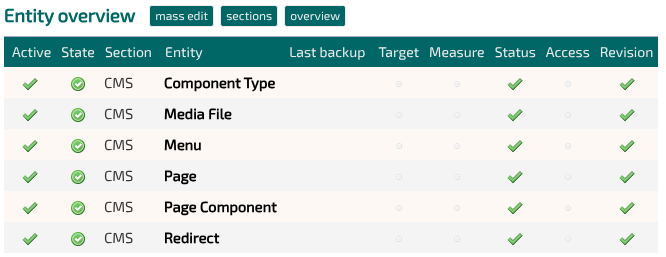
You can read the specific setup of the 6 entities in this feature on the following 6 pages.
Wrapper
A minimum of one wrapper has to be defined in the designer (Design -> Wrappers).
The ID of the wrappers that should be available to the maintainer of the site, are needed in the Page entity.
The wrapper is where you include all the static files that are needed to make the site work, eg. bootstrap.
You don't need to link the stylesheet, the engine will handle that.
Stylesheet
A minimum of one stylesheet has to be defined in the designer (Design -> Stylesheet).
The ID of the stylesheets that should be available to the maintainer of the site, are needed in the Page entity.
Static files (javascript/css/icons)
If your site requires static files, eg. bootstrap, then these should be uploaded to Media files in the designer (Design -> Media files), not to the entity Media Files.
Upload the javascript and css files as "Other" and link to their public path from your wrapper(s).
System configurations (Static content)
The system is quite configurable.
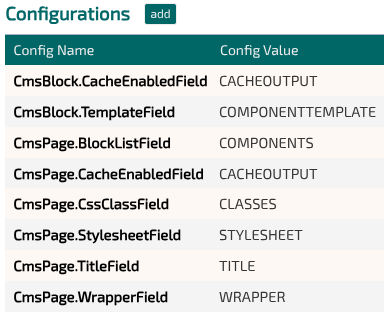
Here is a table of all the available configurations.
| Name | Description | Default value |
| Cms.Media.Field.Type | Systemname of field that defines the type of media file (video/image) | TYPE |
| Cms.Media.Field.Image | Systemname of the field that contains the image for the media file | BILLEDE |
| Cms.Media.Field.Video | Systemname of the field that contains the video for the media file | VIDEO |
| Cms.Media.Field.Path | Systemname of the field that contains the public path for the media file | PATH |
| Cms.Media.Field.AltPath | Systemname of the field that contains the thumbnail or alt-image for the media file | ALTPATH |
| Cms.Media.Field.AltImage | Optional field. Systemname of the field that contains the alt image for the media file |
BILLEDE1 |
| Cms.Media.Folder.Public | The public root path where the media files are available | /media |
| Cms.Media.Folder.System | The path on the server, where the media files are supposed to be saved | /usr/share/tomcat9/webapps/media |
| Cms.Media.Video.HorizontalResolutions | The horizontal resolutions that the down-sampled videos should have. Must be same length as VerticalResolutions and in ascending order. |
[1024,1280,1920] |
| Cms.Media.Video.VerticalResolutions | The vertical resolutions that the down-sampled videos should have. Must be same length as in ascending order. |
[576,720,1080] |
| Cms.Media.Video.Bitrates | The Mbit rates that the down-samled videos should have. Must be same length as VerticalResolutions and in ascending order. |
[2.0,4.0,8.0] |
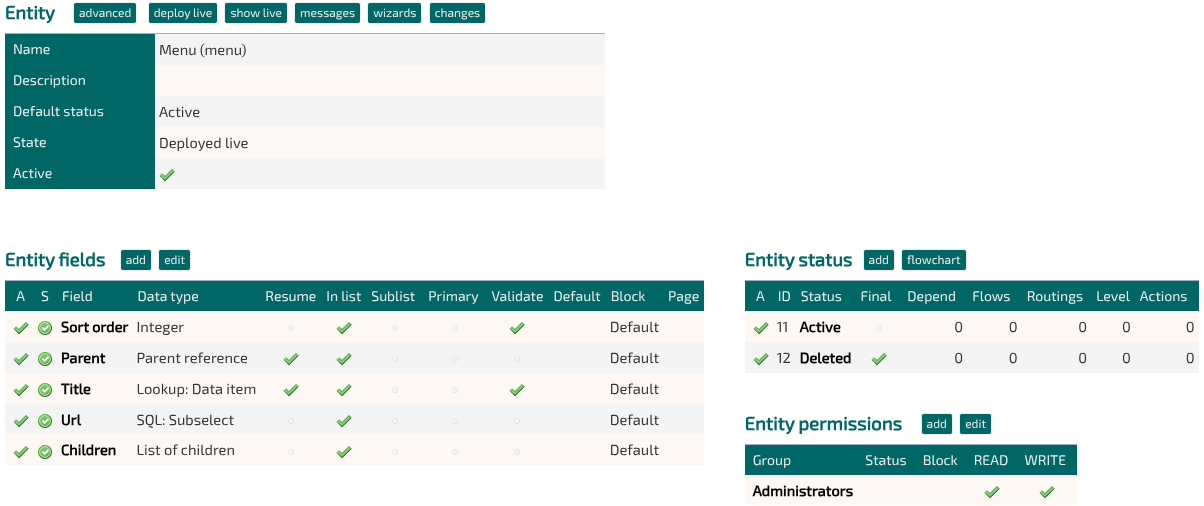
| Cms.Menu.Entity | System name of the entity containing menu items. Used by the codeunit com.tsnocode.core.cms.BasicMenu. |
menu |
| Cms.Menu.Field.Title | System name of the field containing the shown text in a menu item | TITLE |
| Cms.Menu.Field.Url | System name of the field containing the url that the menu item should link to | URL |
| Cms.Menu.Field.Parent | System name of the field that points to a parent menu item | CHILDREN |
| Cms.Menu.Field.Children | System name of the field that lists sub menu items | PARENT |
| Cms.Menu.Html.RootItemEmpty | HTML to generate a root menu item, with no children | * |
| Cms.Menu.Html.RootItem | HTML to generate a root menu item, with children | ** |
| Cms.Menu.Html.ChildItem | HTML to generate a sub menu item | *** |
| Cms.Page.Entity | System name of the entity containing the pages, when accessed from the public /p | pages |
| Cms.Page.Field.Url | System name of the field containing the page urls, when accessed from the public /p/[page-url] | URL |
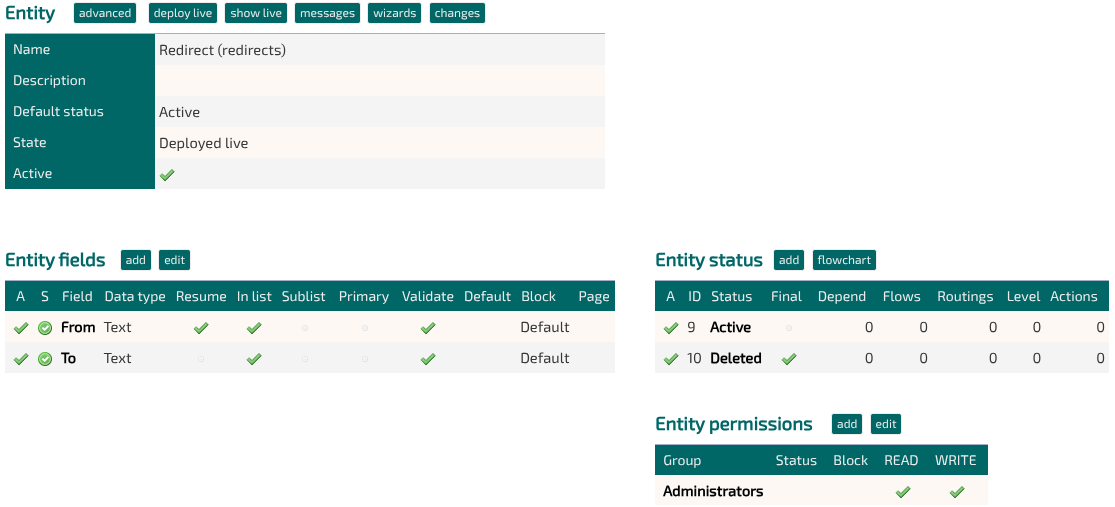
| Cms.Redirects.Entity | System name of the entity containing redirect urls,when accessed from the public /p | redirects |
| Cms.Redirect.Field.From | System name of the field containing the called urls, when accessed from the public /p/[page-url] | FROM_VALUE |
| Cms.Redirect.Field.To | System name of the field containing the urls to redirect to, when accessed from the public /p/[page-url] | TO_VALUE |
*)
<li class="nav-item{ACTIVE}">
  <a class="nav-link" href="{LINK}">{TITLE}</a>
</li>
**)
<li class="nav-item dropdown{ACTIVE}">
  <a class="nav-link dropdown-toggle" href="#" role="button" data-toggle="dropdown" aria-expanded="false">{TITLE}</a>
  <div class="dropdown-menu">{CHILDREN}</div>
</li>
***)
<a class="dropdown-item{ACTIVE}" href="{LINK}">{TITLE}</a>2. Component types
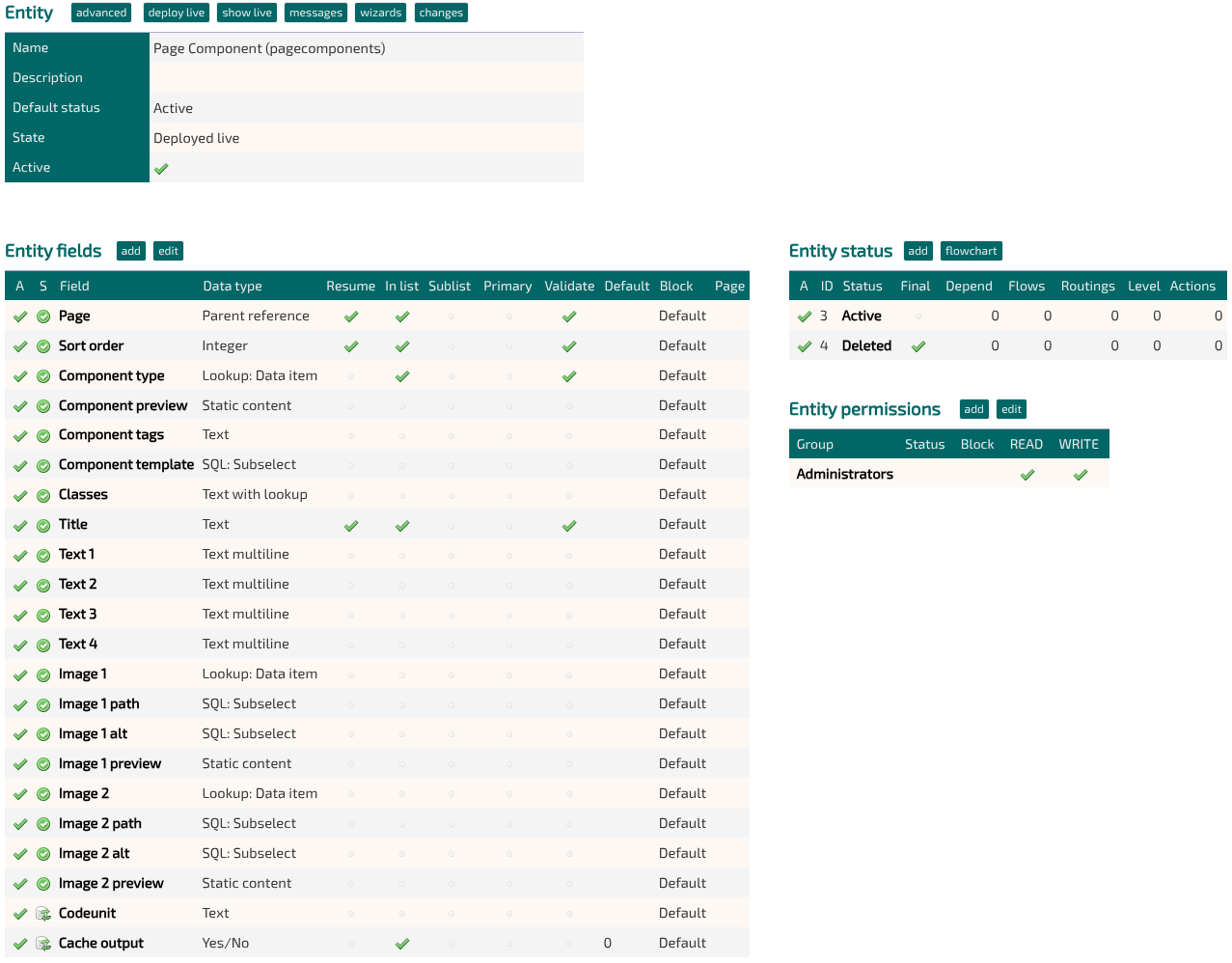
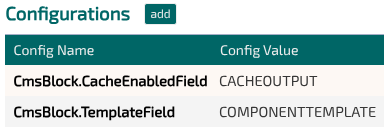
A Component type is a template for a single block, that can be displayed by the CMS.
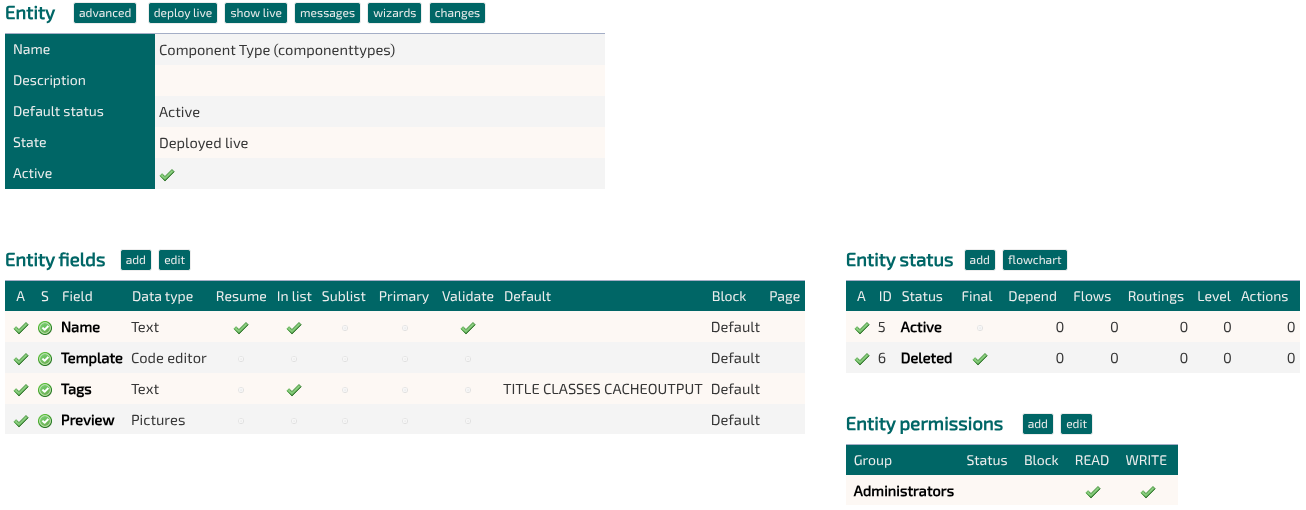
A component type is composed of 4 attributes:
The name
Just the name shown in the dropdown, when selecting a component type for a page component.
The preview image
A sample image, that will be shown when selecting the component type for a page component.
The template
Either:
An ID of an HTML template, defined as a template in the designer.
The raw HTML template.
3. Media
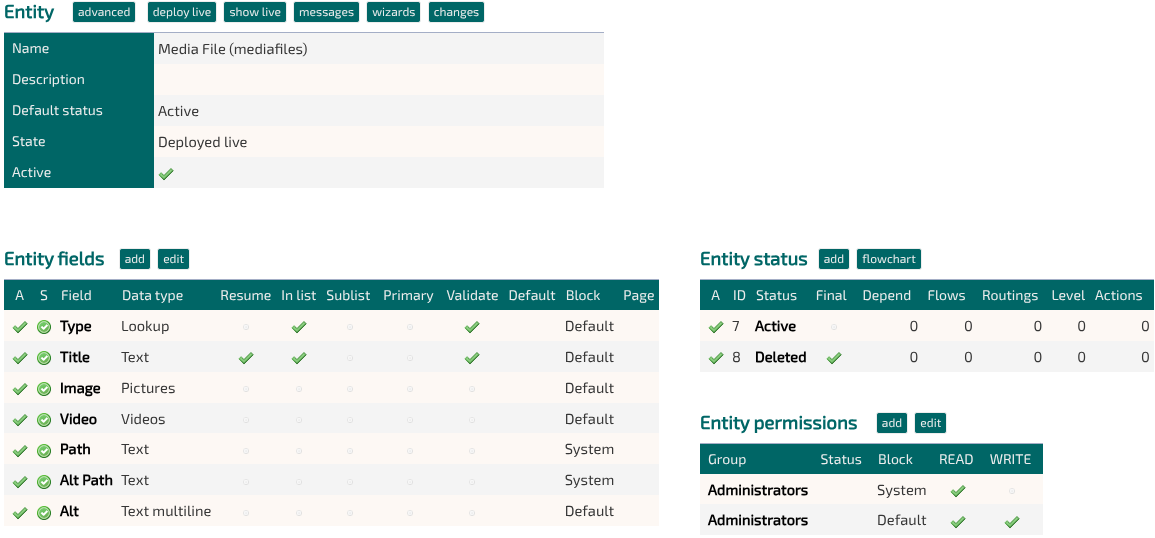
Codeunit
com.tsnocode.core.cms.MediaEventHandler
4. Pages
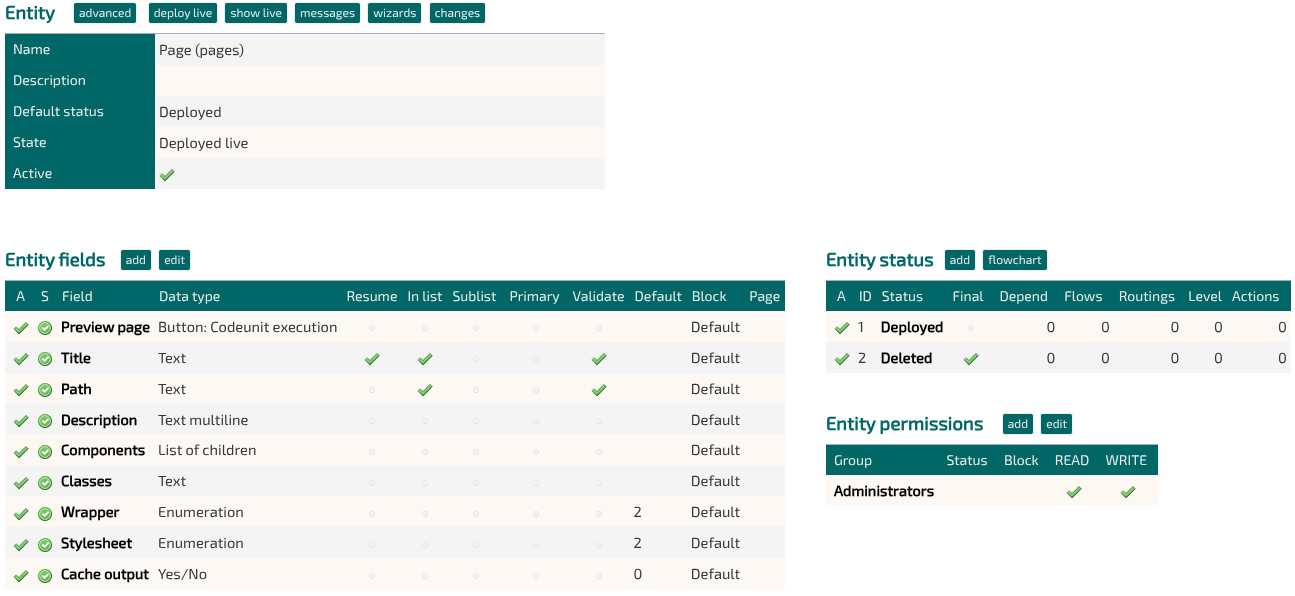
Codeunit
com.tsnocode.core.cms.PageEventHandler
<script type="text/javascript">
function keepUrlSafeChars(input) {
    if (!input)
        return input;
    return input
        .toLowerCase()
        .replace(" ", "-")
        .replace(/[^a-zA-Z0-9\/_-]/g, '');
}
</script>
$("#DATA_TITLE").on("change keyup", () => {
setValue("PATH", keepUrlSafeChars(getValue("TITLE")))
})5. Page components
Headers and scripts
<script type="text/javascript" src="node_modules/lightbox2/dist/js/lightbox.min.js?2.11.5"></script>
<link href="node_modules/lightbox2/dist/css/lightbox.min.css?2.11.5" rel="stylesheet" type="text/css">

<style type="text/css">
#NB_DATA_COMPONENTPREVIEW,
.mergedField .tableImages a:last-of-type {
    display: none;
}
</style>

<script type="text/javascript">
const MEDIA_SAGID = 5
const COMPONENT_SAGID = 4


function checkField(fname) {
    if (getValue("COMPONENTTAGS").includes(fname)) {
        showField(fname)
        $("#VB_DATA_" + fname + "_MERGE").show()
    } else {
        hideField(fname)
        $("#VB_DATA_" + fname + "_MERGE").hide()
    }
}
function handleTags() {
    setValueFromLookup(COMPONENT_SAGID, $("#DATA_COMPONENTTYPE").val(), "TAGS", "COMPONENTTAGS")
    setTimeout(setFieldVisibility, 500)
}
function setFieldVisibility() {
    checkField("TITLE")
    checkField("TEXT1")
    checkField("TEXT2")
    checkField("TEXT3")
    checkField("TEXT4")
    checkField("IMAGE1")
    checkField("IMAGE2")
    //checkField("IMAGE3")
    //checkField("IMAGE4")
    //checkField("VIDEO1")
    checkField("CODEUNIT")
    checkField("CACHEOUTPUT")
}
</script>
// Skjul systemfelter
hideField("COMPONENTTAGS")
hideField("COMPONENTTEMPLATE")
hideField("IMAGE1PATH")
hideField("IMAGE1ALT")
hideField("IMAGE2PATH")
hideField("IMAGE2ALT")
// Preview billeder
let setupPreview = field => {
$("#DATA_" + field).on("change", () => {
preview(field)
})
preview(field);
}
let preview = field => {
if ($("#DATA_" + field + " option:selected").val() == "") {
setValue(field + "PREVIEW", "")
return
}
setValueFromLookup(MEDIA_SAGID, $("#DATA_" + field + " option:selected").val(), "IMAGE", field + "PREVIEW")
}
setupPreview("IMAGE1")
setupPreview("IMAGE2")
// Preview component
let setupPreviewType = field => {
$("#DATA_COMPONENTTYPE").on("change", () => {
previewType(field)
})
previewType(field)
}
let previewType = field => {
if ($("#DATA_COMPONENTTYPE option:selected").val() == "") {
setValue("COMPONENTPREVIEW", "")
return
}
setValueFromLookup(COMPONENT_SAGID, $("#DATA_COMPONENTTYPE option:selected").val(), "PREVIEW", "COMPONENTPREVIEW")
}
setupPreviewType()
// Handle tags
$("#DATA_COMPONENTTYPE").on('change', () => {
handleTags()
})
handleTags()
6. Menu
7. Redirects
8. Default Codeunits
The platform ships with a couple default codeunits, that help manage the CMS data.
Basic Menu
Name: com.tsnocode.core.cms.BasicMenu
Generates a dynamic menu, with option of one layer of sub-element, and marks the active page.
Page handler
Name: com.tsnocode.core.cms.PageEventHandler
Helps maintain redirects, when a pages url changes, by automatically added the old url to the redirects entity.
Media handler
Name: com.tsnocode.core.cms.MediaEventHandler
Helps write images and videos to disk, and down sampling videos.
Preview page
Name: com.tsnocode.core.cms.ShowPage
Resets the cache and shows a page.