Pages
- Clone System
- Copy Structure
- Clone records
- Static Content
- Users By Group
- Users Online
- Website Iframe
- Solution Structure View
- Gantt Diagram
- Move a File
- Convert database to UTF-8
- Bulk importing files
- Update resume for entire entity
- Cleanup Inactive Model Parts
- Fix Docx Tags
- Reinvite Users
- Generate Video Thumbnails
- Export Template To WebDav
- Bulk import files
- Dynamically change users exclusive group
- Is Date weekend/holiday
Clone System
What it does
Clones the entire webapp to another server.
Only works on linux.
First setup
- Generate an SSH key for the tomcat-user on the source server
sudo -u tomcat ssh-keygen - Add the public key to a user on the target server that has sudo-access
- Connect from the source server, as tomcat, to the target server and accept the certificate
- Add configurations
How to invoke
Invoke the codeunit, as an admin. eg.
[SERVER]/main?command=common.CloneSystem
Options
Control the behavior with the following url-parameters.
| Parameter | Desctiption |
|---|---|
| with-users | Also clones the users and their groups |
| with-files | Also clones the files uploaded |
| dont-backup-target | Does not create a copy of the database on the target server with the name _backupyyyyMMddHHmm |
| dont-clean | Does not remove the sql files on both systems |
Configuration
| Config | Default | Description |
|---|---|---|
| CloneSystem.targetServer | IP or domain of target server | |
| CloneSystem.targetUser | ec2-user | Name of the user that is being used on the target server |
| CloneSystem.targetBasePath | Policy:applicationBasePath | Webapps, folder on target server |
| CloneSystem.targetApp | Policy:applicationName | Application name on target server |
| CloneSystem.targetDb | DbLive-name | Name of live server on target server |
Developer info
- Type: CodeunitPagecontent
- Security: Requires session
- Classpath: com.tsnocode.codeunit.common.CloneSystem
Copy Structure
What it does
Will copy all fields except files and pictures, but all sub child entities (1 level, non recursive).
How to invoke
The page is called with the command: dk.tempusserva.codeunit.common.PageCopyStructure
Takes the following parameters
- SagID
- DataID
The user activating the function must have the group specified in "AllowCloneGroup"
Example of usage:
main?command=dk.tempusserva.codeunit.common.PageCopyStructure&SagID=10&DataID=100Example of URL pattern
main?command=dk.tempusserva.codeunit.common.PageCopyStructure&SagID=10&DataID=[DataID]Configuration
[All possible configurations and where to edit them]
Developer info
- Type: CodeunitPagecontent
- Security: [eg. requires admin or session]
- Classpath: dk.tempusserva.codeunit.common.PageCopyStructure
Clone records
Usage
This function will copy a single record
Configuration guide
main?command=com.tsnocode.codeunit.common.CloneRecord&SagID=[SagID]&DataID=[DataID]Developer info
- Type: CodeunitPagecontent
- Security: [eg. requires admin or session]
- Classpath: com.tsnocode.codeunit.common.CloneRecord
Static Content
What it does
Displays configurable static HTML code.
How to invoke
Make a http request:
main?command=dk.p2e.blanket.codeunit.common.PageStaticContentConfiguration
Set up HTML:
Designer > Modules > Static content > StaticPageContent
Developer info
- Type: CodeunitPagecontent
- Security: Requires session
- Classpath: dk.p2e.blanket.codeunit.common.PageStaticContent
Users By Group
What it does
Displays list of active users in the system.
Multi mode function
- User normal: No filters
- User exclusive group: Filters users/groups that active user belongs to
- Lists exclusive groups + none
- Lists users in selected exclusive group (1)
- Lists groups for selected user (2)
How to invoke
Make a http request:
main?command=dk.p2e.blanket.codeunit.common.PageUsersByGroup
Configuration
None
Developer info
- Type: CodeunitPagecontent
- Security: Requires UderEditor or Admin
- Classpath: dk.p2e.blanket.codeunit.common.PageUsersByGroup
Users Online
What it does
Displays a list of users with a session on the current server
How to invoke
Make a http request:
main?command=common.PageUsersOnlineConfiguration
None
Developer info
- Type: CodeunitPagecontent
- Security: Requires admin
- Classpath: dk.p2e.blanket.codeunit.common.PageUsersOnline
Website Iframe
What it does
Displays a configurable webpage in an IFrame.
How to invoke
Make a http request:
main?command=dk.p2e.blanket.codeunit.common.PageWebsiteIframeConfiguration
Set up IFrame options:
Designer > Modules > Static content
- WebsiteIframeURL
- WebsiteIframeWidth
- WebsiteIframeHeight
Developer info
- Type: CodeunitPagecontent
- Security: Requires session
- Classpath: dk.p2e.blanket.codeunit.common.PageWebsiteIframe
Solution Structure View
What it does
Lists the components (fields, status etc.) in the current solution.
How to invoke
Make a http request including a valid SagID:
main?SagID=[SagID]&command=common.SolutionStructureViewConfiguration
None
Developer info
- Type: CodeunitPagecontent
- Security: Requires session
- Classpath: dk.p2e.blanket.codeunit.common.SolutionStructureView
Gantt Diagram
What it does
The platform has a build-in gantt chart generator.
It supports zooming, nesting and relations.
The datastructure has to be a single entity.
If your data isn't contained in a single entity use Gantt Sync CodeUnit.
Sample
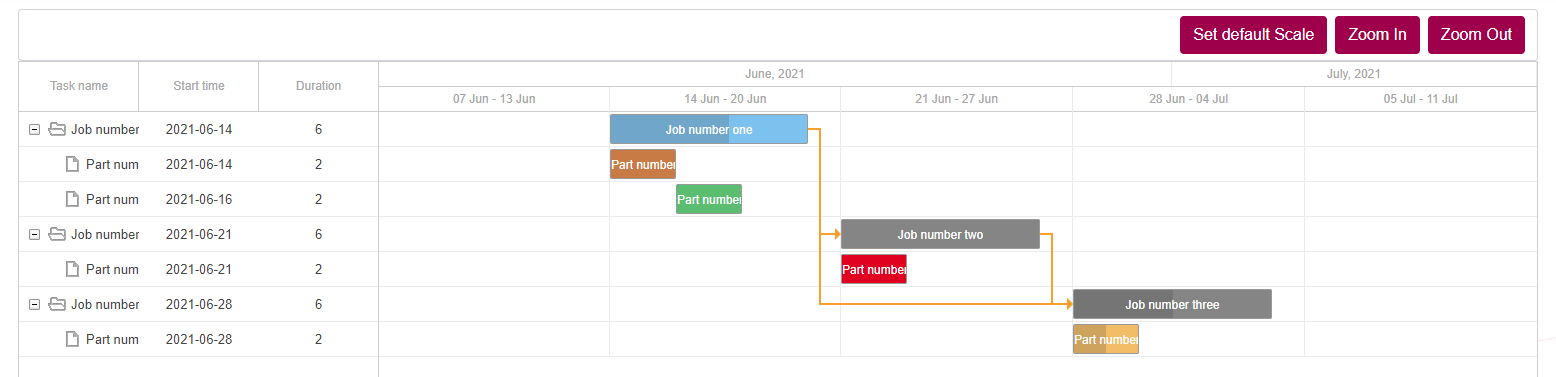
How to invoke
To view the gantt chart, access: main?command=dk.tempusserva.gantt.DhtmlXGanttPage&SagID=[SagID]
Options
Basic setup
To view a gantt chart, first access the page main?command=dk.tempusserva.gantt.DhtmlXGanttPage to generate the required static configurations.
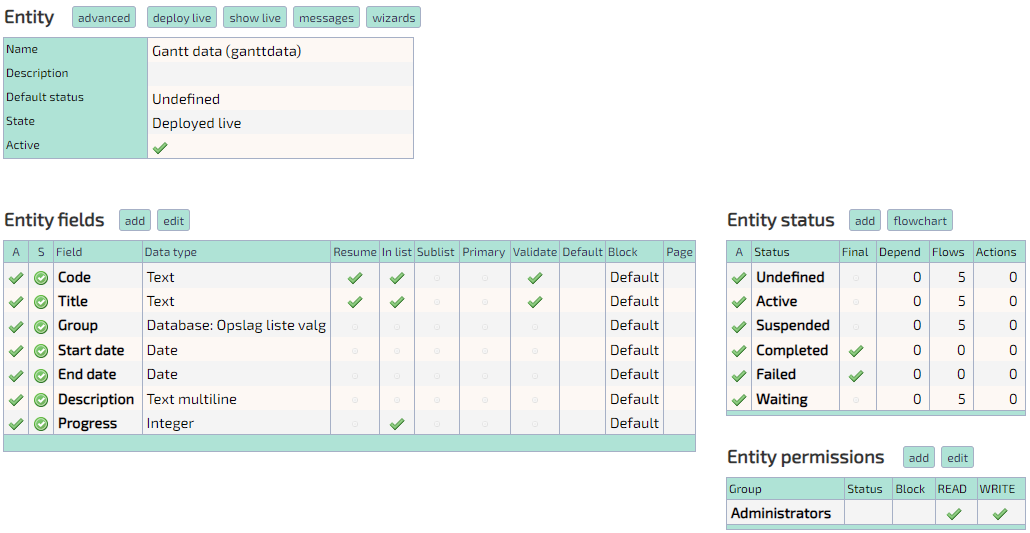
Six fields are required in the table, that the data is being read from:
Code, Title, Group, Start date, End date and Progress.
Code and Title have to be single-line text inputs.
Progress has to be an integer input, it represents how far along the task is, in percent.
Start and End date have to be dates.
Group should store the DataID of the parent-task. Here a database-lookup is used, executing query: SELECT DataID, Resume FROM data_ganttdata and displaying field Resume.
Also at least 5 statuses:
Active, Suspended, Completed, Failed and Waiting.
All other statuses will be marked as Undefined.
Sample
Relations
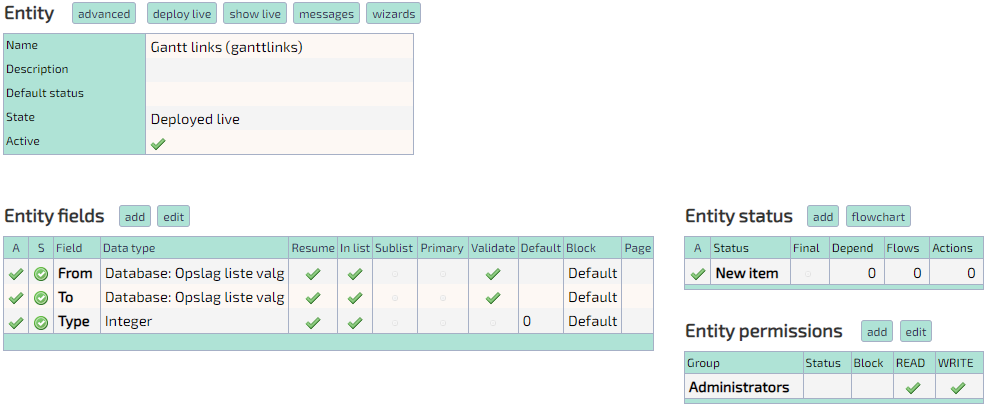
To view relations between tasks, create another table.
Two fields are required:
From and To.
A third field Type can be added, but isn't required.
From and To have to store the DataID of the tasks that should be linked via a relation. This setup is the same as Group.
Type has to have value of 1 or 0, any other value is overwritten to 0. This defines whether the relation is drawn from the beginning (1) or end (0) of the From-task.
To view the gantt chart, access: main?command=dk.tempusserva.gantt.DhtmlXGanttPage&SagID=[SagID]&LinkSagID=[RelationSagID]
Sample
Configuration
| Static config | Default value | Description |
| Gantt.Field.Group | GROUP_VALUE | Name of the column that contains the DataID of parent-task |
| Gantt.Field.StartDate | STARTDATE | Name of the column that contains the task-start date |
| Gantt.Field.EndDate | ENDDATE | Name of the column that contains the task-end date |
| Gantt.Field.Code | CODE | Name of the column that contains the task-code |
| Gantt.Field.Title | TITLE | Name of the column that contains the task-title |
| Gantt.Field.Progress | PROGRESS | Name of the column that contains the task-progress |
| Gantt.Filter.Field | TASKTYPE | Name of a column that contains a value that should be filtered to match Gantt.Filter.Value |
| Gantt.Filter.Value | 249 | Value that task have to equal in column Gantt.Filter.Field |
| Gantt.Field.Link.From | FROM | Name of column that contains DataID of source-task in a relation |
| Gantt.Field.Link.To | TO | Name of column that contains DataID of target-task in a relation |
| Gantt.Field.Link.Type | Name of column that contains type of relation, not required | |
| Gantt.StatusID.Active | 1 | ID of status that marks a task as Active |
| Gantt.StatusID.Waiting | 2 | ID of status that marks a task as Waiting |
| Gantt.StatusID.Suspended | 3 | ID of status that marks a task as Suspended |
| Gantt.StatusID.Completed | 4 | ID of status that marks a task as Completed |
| Gantt.StatusID.Failed | 5 | ID of status that marks a task as Failed |
| Gantt.StatusColor.Undefined | #858586 | CSS-color of tasks with status Undefined |
| Gantt.StatusColor.Active | #76C0F1 | CSS-color of tasks with status Active |
| Gantt.StatusColor.Waiting | #F6BF5F | CSS-color of tasks with status Waiting |
| Gantt.StatusColor.Suspended | #F28F42 | CSS-color of tasks with status Suspended |
| Gantt.StatusColor.Completed | #4DBE6C | CSS-color of tasks with status Completed |
| Gantt.StatusColor.Failed | #E70015 | CSS-color of tasks with status Failed |
Advanced usage
It's possible to override the static content.
To do so, add the desired value to the url.
Example:
To override the field used for Title, add &Gantt.Field.Title=[field-name] to the url
Exporting
The chart supports exporting to Excel and iCal formats.
It's possible to overwrite the export, be declaring a javascript function named customExportToExcel or customExportToICal. Either takes one argument: the gantt object.
Heres an example that removes html markup from the gantt titles before export.
function customExportToExcel(gantt) {
  var data = gantt.getDatastore("task").getVisibleItems();
  var rtn = [];
  for (var i = 0; i < data.length; i++) {
    var d = new Date(data[i].start_date);
    rtn[i] = {
      color: data[i].color,
      duration: data[i].duration,
      id: data[i].id,
      open: data[i].open,
      parent: (data[i].parent == "0" || data[i].parent == 0 ? "" : data[i].parent),
      progress: data[i].progress,
      start_date: d.getFullYear() + "-" + ("0"+(d.getMonth()+1)).slice(-2) + "-" + ("0" + d.getDate()).slice(-2) + " " + ("0" + d.getHours()).slice(-2) + ":" + ("0" + d.getMinutes()).slice(-2),
      text: $(data[i].text).text(),
    };
  }
  console.log(rtn);
  viewGantt({data: rtn, links: []});
  setTimeout(function() {
    gantt.exportToExcel();
  }, 5);
  setTimeout(loadGantt, 100);
}
Developer info
- Type: CodeunitPagecontent
- Security: Requires session
- Classpath: dk.tempusserva.gantt.DhtmlXGanttPage
Move a File
What it does
Moves a file from one document-field to another, on the same entity.
Works between document-fields with and without signing.
How to invoke
Add the following snippet to the entity scripts. This enables movement between all document-fields on the entity.
It adds another column to the file-lists, with a "Move" link. When clicked it opens a popup, with a dropdown where the new field can be selected.
const moveFile = (id, to) => {
  const params = new URLSearchParams(window.location.search)
  $.ajax({
    url: "main",
    method: "GET",
    data: {
      "command": "dk.tempusserva.codeunit.common.MoveFile",
      "SagID": params.get("SagID"),
      "DataID": params.get("DataID"),
      "FileID": id.split("_")[2],
      "FieldFrom": id.split("_")[1],
      "FieldTo": to,
    },
    success: (data) => {
      if (data == "File moved") {
        $(`#${id}`).find("td").last().html("Moved")
      } else {
        alert(data)
      }
    },
  })
}

$(() => {
  const moveFileAction = () => {
    console.log("yay")
    moveFile($("#modeFileFrom").val(), $("#moveFileTo").val())
    $("#moveFilePopup").remove()
  }
  $(() => {
    $(".tableFiles").each((i,e) => {
      let t = $(e)
      t.find("thead").find("tr").each((i,e) => { $(e).append("<th></th>") })
      t.find("tbody").find("tr").each((i,e) => { $(e).append(`<td><a href="#" class="moveFile">Move</a></td>`) })
    })
    $(".moveFile").on("click", (e) => {
      e.preventDefault()
      let t = $(e.currentTarget)
      let id = t.parent().parent().attr("id")
      let r = `<select class="form-control" id="moveFileTo">`
      r += `<option value="">Select a field</option>`;
      $(".uploadFiles").each((i,e) => {
        let p = $(e).parent().attr("id").replace("VB_DATA_", "")
        if (id.split("_")[1] != p) {
          let x = $(e).parent().parent().parent().find(`#NB_DATA_${p}`).html()
          r += `<option value="${p}">${x}</option>`
        }
      })
      r += "</select>"
      $("#TempusServaPage").append(`
        <div id="moveFilePopup" style="display: none;">
          <label>Move file to:</label>
          ${r}
          <input type="hidden" id="modeFileFrom" value="${id}"/>
          <a href="javascript:moveFileAction();" class="moveFileAction">Move</a>
        </div>
      `)
      createJqueryDialog("moveFilePopup")
    })
  })
})
Configuration
None
Developer info
- Type: CodeunitPagecontent (raw)
- Security: Requires session
- Classpath: dk.tempusserva.codeunit.common.MoveFile
Convert database to UTF-8
What it does
Special characters causing errors
The default support for UTF8 is 3 byte.
Using 4 byte UTF content in text areas, can cause errors, that looks like
java.sql.SQLException: Incorrect string value: '\xC2\x96 Z. ...' for column 'NOTES' at row 1How to invoke
Update the database to full UTF8 support using the following command
main?command=dk.p2e.blanket.codeunit.common.PageConvertDatabaseToUTF8Note an administration profile is needed to complete the operation.
You might also have to update the tomcat server.xml file.
You have to add useBodyEncodingForURI="true" to the connectors.
Note that this codeunit has build in protection against being excuted multiple times at once, and should be executed every time a new field or entity has been added to the database.
Issue before version 11315 on MariaDB
Due to a difference in how MySQL and MariaDB stores "DEFALUT NULL", when executing this codeunit on a MariaDB server, all columns with the default value of null would be updated to have a default value of 'NULL' (the string NULL, not the empty value null).
To find the affected columns and generate all the required sql to fix the issue, run the following query.
Remember to reaplce [LIVE DB] with the name of the live database of your instance!
SELECT a.TABLE_NAME, a.COLUMN_NAME, CONCAT('ALTER TABLE ', a.TABLE_NAME, ' ALTER ', a.COLUMN_NAME, ' SET DEFAULT NULL;') AS upd
FROM information_schema.columns AS a
INNER JOIN INFORMATION_SCHEMA.TABLES b ON
	a.TABLE_CATALOG = b.TABLE_CATALOG AND
	a.TABLE_SCHEMA = b.TABLE_SCHEMA AND
	a.TABLE_NAME = b.TABLE_NAME AND
	LOWER(b.table_type) != 'view'
WHERE a.COLUMN_DEFAULT = '\'NULL\'' AND
a.TABLE_SCHEMA = '[LIVE DB]'
This should create one row for every column in the database that has a default value of the string 'NULL'.
Take the output of the third column, copy all rows and execute them against the database.
Should look something like this:
ALTER TABLE form ALTER SagNavnI18N SET DEFAULT NULL;
ALTER TABLE form ALTER EntityIcon SET DEFAULT NULL;
ALTER TABLE form ALTER Description SET DEFAULT NULL;
ALTER TABLE form ALTER DescriptionI18N SET DEFAULT NULL;
ALTER TABLE form ALTER MailDomains SET DEFAULT NULL;
ALTER TABLE form ALTER MailSecurity SET DEFAULT NULL;
ALTER TABLE form ALTER Codeunit SET DEFAULT NULL;
ALTER TABLE form ALTER Instructions SET DEFAULT NULL;
Go back and execute the first query, it now should return 0 rows.
Options
None.
Configuration
None.
Developer info
- Type: CodeunitPagecontent
- Security: Requires administrator
- Classpath: dk.p2e.blanket.codeunit.common.PageConvertDatabaseToUTF8
Bulk importing files
What it does
This page describes how to setup the bulk-import codeunit, to import a lot of files at once and generate a separate record in an entity, for each file.
First setup
First, setup an entity with at least two fields: A text-field for the filename and a document field for the document.
Second, create or edit the following 5 "Static content".
- BulkImport.SagID, the SagID of the entity that is the target of the import
- BulkImport.UserGroupID, The GroupID of the usergroup that is allowed to access the bulk-import system
- BulkImport.FileTitleField, The systemname of the field where the name of the file should be stored
- BulkImport.FileFieldID, The FieldID of the field where the uploaded document should be stored
- BulkImport.StatusID, The StatusID that uploaded documents should have
Third, edit the url on the site and access main?command=dk.tempusserva.codeunit.bulkimport.ImportPage
Fourth, upload the files.
Next step could be to index all the files, allowing the content of the files to be searched and queried, maybe through ChatGPT.
How to invoke
[Steps to enable codeunit]
Options
[Optional options, that can be set at runtime, eg. url-parameters]
Configuration
[All possible configurations and where to edit them]
Developer info
- Type: CodeunitPagecontent
- Security: [eg. requires admin or session]
- Classpath: dk.tempusserva.codeunit.bulkimport.ImportPage
Update resume for entire entity
What it does
Updates the resume for all records in a given entity
How to invoke
The page is called with the command: com.tsnocode.codeunit.backend.UpdateEntityResumes
Requires the following parameter
- SagID
Example of usage:
main?command=com.tsnocode.codeunit.backend.UpdateEntityResumes&SagID=10&RecordLimit=10000Options
Takes the following parameters
- RecordLimit (default 1000)
- BatchSize (default 100)
Developer info
- Type: CodeunitPagecontent
- Security: requires admin
- Classpath: com.tsnocode.codeunit.backend.UpdateEntityResumes
Cleanup Inactive Model Parts
What it does
Removes all states in an entity, that have no records and are marked as inaktive.
How to invoke
Call the codeunit, with the SagID to clean.
main?command=com.tsnocode.codeunit.backend.CleanupInactiveModelParts&SagID=[SagID]Developer info
- Type: CodeunitPagecontent
- Security: administrator
- Classpath: com.tsnocode.codeunit.backend.CleanupInactiveModelParts
Fix Docx Tags
What it does
Tries to fix templating tags in a docx template.
How to invoke
Call the codeunit, along with a TemplateID
main?command=com.tsnocode.codeunit.backend.FixDocxTags&TemplateID=[TemplateID]Developer info
- Type: CodeunitPagecontent
- Security: administrator
- Classpath: com.tsnocode.codeunit.backend.FixDocxTags
Reinvite Users
What it does
Resets passwords and sends out welcome messages, to all of the listed emails.
First setup
Setup the configuration "ReinviteUsersGroupID".
How to invoke
Call the page
main?command=com.tsnocode.codeunit.backend.ReinviteUsersInput the emails that should be reset and re-invited, one email pr line, and submit the form.
Configuration
ReinviteUsersGroupID
Developer info
- Type: CodeunitPagecontent
- Security: administrator and specific group
- Classpath: com.tsnocode.codeunit.backend.ReinviteUsers
Generate Video Thumbnails
What it does
Generates missing thumbnails for files in an entity.
First setup
Make sure the application is using filesystem storage (filesystemStorageActive)
How to invoke
Call the page
main?command=com.tsnocode.codeunit.common.GenerateVideoThumbnails&SagID=[SagID]Configuration
You can adjust the thumbnail size via the policy uploadPictureSizeThumbnail
Developer info
- Type: CodeunitPagecontent
- Security: administrator
- Classpath: com.tsnocode.codeunit.common.GenerateVideoThumbnails
Export Template To WebDav
What it does
Exports a template, saves it to the record, and opens it via webdav.
First setup
Add an action button with the correct parameters
How to invoke
Call the page, e.g. via an action button
main?command=com.tsnocode.codeunit.common.SaveTemplateToWebDav&SagID=[SagID]&DataID=[DataID]&TemplateID=[TemplateID]&Filename=[Filename]&Field=[Field]
Options
- SagID
- DataID
- TemplateID
- Filename, Name of the generated file
- Field, Field systemname to save the generated file to
Developer info
- Type: CodeunitPagecontent
- Security: session
- Classpath: com.tsnocode.codeunit.common.SaveTemplateToWebDav
Bulk import files
What it does
Imports files and creates a record for each of them.
First setup
[Optional, if extra config is required to get the codeunit working]
How to invoke
Open the page
main?command=com.tsnocode.codeunit.system.bulkimport.ImportPage
Options
[Optional options, that can be set at runtime, eg. url-parameters]
Configuration
[All possible configurations and where to edit them]
Developer info
- Type: CodeunitPagecontent
- Security: admin, datahandler, or specific group
- Classpath: com.tsnocode.codeunit.system.bulkimport.ImportPage
Dynamically change users exclusive group
What it does
Gives the user a list of exclusive groups defined in the application. The user can select one and will have their exclusive group set to that value untill they sign out.
Also supports changing the users exclusive group, if the already have one.
Does not support advanced security with multiple exclusive groups.
First setup
Enable the policy securityExclusiveGroupSet.
If the option to change groups is required, enable the policy securityExclusiveGroupChange.
How to invoke
Add a button that links to this codeunit
main?command=dk.p2e.blanket.codeunit.common.PageSetExclusiveGroup
Options
None
Configuration
None
Developer info
- Type: CodeunitPagecontent
- Security: Session
- Classpath: dk.p2e.blanket.codeunit.common.PageSetExclusiveGroup
Is Date weekend/holiday
What it does
Tests wether a date is a weekend date and/or a holiday (based on those that are input via the designer).
Available from version 11968.
First setup
Just make sure that you maintain the list of holidays (in the designer).
How to invoke
Make an http request to
main?command=com.tsnocode.codeunit.frontend.TestDate&Date=[DATE]This will return a json object.
{
  "date": "2026-05-14",
  "isHoliday": true,
  "isWeekend": false,
  "error": false,
  "holidayName": "Kristihimmelfart"
}
If error is true, then a message (msg) will also be available.
If isHoliday is true, then a holidayName should also be returned. (As of version 12007)
Developer info
- Type: [Type+link]
- Security: [eg. requires admin or session]
- Classpath: [full class path]