Action button
- Package name: button
- Button: Token URL builder
- Button: Export template
- Button: Script execution
- Button: Parameterized URL
- Button: Related list search
- Button: Grand child search
- Button: Codeunit execution
- Button: Status changer
- Filter selector static
- Button: Clone record
Button: Token URL builder
Building link to external users
Properties
- Type: Action button
- Groupable: No
- Show in lists: No
- Searchable: No
- Requires configuration: Yes
User interface
Field in show mode

Due to its nature this field has no special editing mode.
Configuration
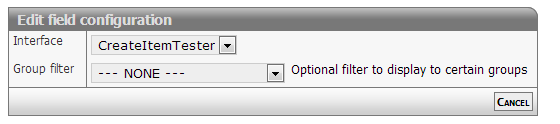
[Description of configs]
Developer info
- FeltTypeID: 710
- SQL datatype: N/A
- Class name: FieldTokenMailto
Button: Export template
Export of data to a certain template
Properties
- Type: Action button
- Groupable: No
- Show in lists: No
- Searchable: No
User interface
Field in show mode

Due to its nature this field has no special editing mode.
Configuration
This field requires configuration before deployment.

[Description of configs]
Developer info
- FeltTypeID: 720
- SQL datatype: N/A
- Class name: FieldExportTemplate
Button: Script execution
Execute script when clicking the button, with option to save data first.
Properties
- Type: Action button
- Groupable: No
- Show in lists: No
- Searchable: No
User interface
Field in show mode

Due to its nature this field has no special editing mode.
Configuration
This field requires configuration before deployment.

Javascript: Here you write code to be executed when button is pressed.
Submit after: Saves the record immediately after code has been run.
Group filter: limit access to a single group.
Developer info
- FeltTypeID: 730
- SQL datatype: N/A
- Class name: FieldExecuteJavaScript
Button: Parameterized URL
Button to navigate somewhere else. Can be to an external url.
Properties
- Type: Action button
- Groupable: No
- Show in lists: No
- Searchable: No
- Requires configuration: Yes
User interface
Field in show mode

Due to its nature this field has no special editing mode.
Configuration

URL template: Here you write the target url of the button link. You can use data from a field with the syntax [*DATA*]. DataID can likewise be used via [DataID]. It is also possible to use this field to point to some other location in the application by starting the url from "main?".
Group filter: Contrary to what it says, you can only filter to a single group, not several.
Developer info
- FeltTypeID: 740
- SQL datatype: N/A
- Class name: FieldParameterLookup
Button: Related list search
Look-up in related list with parameter
Properties
- Type: Action button
- Groupable: No
- Show in lists: No
- Searchable: No
- Requires configuration: Yes
User interface
Field in show mode

Due to its nature this field has no special editing mode.
Configuration
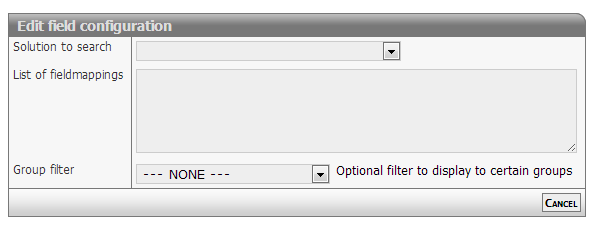
[Description of configs]
Developer info
- FeltTypeID: 741
- SQL datatype: N/A
- Class name: FieldParameterListSearch
Button: Grand child search
Look-up in related data (Grand children)
Properties
- Type: Action button
- Groupable: No
- Show in lists: No
- Searchable: No
User interface
Field in show mode

Due to its nature this field has no special editing mode.
Configuration
Due to its nature this field has no special editing mode.
[INSERT IMAGE]
[Description of configs]
Developer info
- FeltTypeID: 742
- SQL datatype: N/A
- Class name: FieldGrandChildSearch
Button: Codeunit execution
Execute proprietary code
Properties
- Type: Action button
- Groupable: No
- Show in lists: No
- Searchable: No
User interface
Field in show mode

Due to its nature this field has no special editing mode.
Configuration

[Description of configs]
Ajax subforms
The following code changes subform behavior to call the codeunit silently and reload the page when done
$(function() {
  $('#VB_DATA_SUBFORM a.codeunitButton').click( function(e) {
    e.preventDefault();
    $.get( $(this).attr("href") );
    //$(this).parent().parent().hide();
    location.reload();
    return false;
  });
});
Developer info
- FeltTypeID: 750
- SQL datatype: N/A
- Class name: FieldCodeunitPage
Button: Status changer
Changes the status of the record to the selected status
Properties
- Type: Action button
- Groupable: No
- Show in lists: Yes
- Searchable: No
- Requires configuration: No
User interface
Field in show mode
[INSERT IMAGE]
Due to its nature this field has no special editing mode.
Configuration
[INSERT IMAGE]
The field does not required configuration before deployment, but does take up to 3 parameters.
Configuration 1: Mandatory StatusID to change to. Forces only that Status to chow up.
Configuration 2: Optional field to set to NOW upon button-click
Configuration 3: Group filter. Filter button to only be shown to users with that GroupID
Developer info
- FeltTypeID: 751
- SQL datatype: N/A
- Class name: FieldStateChanger
Filter selector static
Set value in user session. For example for data filters.
Properties
- Type: Action button
- Groupable: No
- Show in lists: No
- Searchable: No
- Requires configuration: Yes
User interface
Field in show mode
[INSERT IMAGE]
Field in edit mode
[INSERT IMAGE]
Configuration
[INSERT IMAGE]
[Description of configs]
Developer info
- FeltTypeID: 2090
- SQL datatype: N/A
- Class name: FieldSessionFilterSelector
Button: Clone record
[DESCRIPTION]
Properties
- Type: Parent/child
- Groupable: [YES/NO]
- Show in lists: [YES/NO]
- Searchable: [YES/NO]
User interface
Field in show mode
[INSERT IMAGE]
Field in edit mode
[INSERT IMAGE]
Configuration
[INSERT IMAGE]
[Eventuel beskrivelse af configs]
Developer info
- FeltTypeID: 753
- SQL datatype: N/A
- Class name: FieldCloneRecord