Complex
- Package name: special
- Checklist lookup
- Signature
- Calc: Formula
- Calc: Test value
- Calc: Concatenate
- Calc: JavaScript
- Calc: Time lifecycle
- Calc: Time measured
- Calc: Score interval
- Calc: Check fields
- Comments
- Related form multiselect
- Related form multiselect SQL
- XML data
- Barcode (status change)
- SQL: Table query
- Calc: Flag
- Related entity multiline decimal
- Token display
- Calc: Document section
- Geomap Coding
- Geomap
Checklist lookup
Number of categories
Properties
- Type: Complex
- Groupable: Yes
- Show in lists: Yes
- Searchable: Yes
User interface
Field in show mode

Field in edit mode

Configuration

[Description of configs]
Developer info
- FeltTypeID: 62
- SQL datatype: INT(11)
- Class name: FieldMultiSelect
Signature
Digital signature or approval
Properties
- Type: Complex
- Groupable: No
- Show in lists: Yes
- Searchable: Yes
- Requires configuration: [Yes/no]
User interface
Field in show mode

Field in edit mode

Configuration

[Description of configs]
Developer info
- FeltTypeID: 65
- SQL datatype: INT(11)
- Class name: FieldSignature
Calc: Formula
Formula based on other fields
Properties
- Type: Complex
- Groupable: No
- Show in lists: Yes
- Searchable: Yes
- Requires configuration: Yes
User interface
Field in show mode

Due to its nature this field has no special editing mode.
Configuration
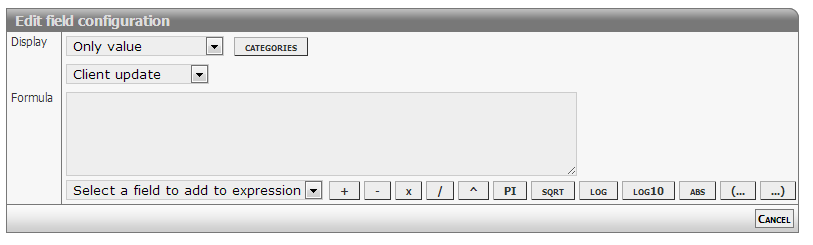
[Description of configs]
Complex formulas
Calculated formulas syntax follows is compliant with JavaScript syntax.
Common operators
- Add: +
- Subtract: -
- Division: /
- Multiply: *
- Modulus: %
- Precedence: ( ... )
Mathematical functions
- Absolute: abs
- Minimum: max
- Maximum: min
- Power: pow
- Square root: sqrt
- Logarithms: log log10 exp
- Rounding: ceil floor round
Mathematical constants
- Pi: pi
- E: e
Support for statements
This feature is enabled starting from version 2366.
IF statement
Syntax used matches JavaScript inline IF statements.
To make the statement work make sure to add a space: before ), after (, before and after ? and :.
( Value1 Operator Value2 ? ValueIfTrue : ValueIfFalse )- Test
- First value or expression
- Operator
- Equal: =
- Unequal: !=
- Greater: > (>=)
- Lesser: < (<=)
- Second value or expression
- Result
- TRUE value or expression
- FALSE value or expression
Examples
Script code / specification
 var result;
 if ( [NUMBER1] >  [NUMBER2] ) {
       result = [NUMBER1] * 11;
 }
 else {
       result = [NUMBER3];
 }
 return result;
Expression to use in formula
( [NUMBER1] > [NUMBER2] ? [NUMBER1] * 11 : [NUMBER3] )Developer info
- FeltTypeID: 81
- SQL datatype: DECIMAL(20,4)
- Class name: FieldCalcFormula
Calc: Test value
Test of the value of another field
Properties
- Type: Complex
- Groupable: No
- Show in lists: Yes
- Searchable: Yes
User interface
Field in show mode
[INSERT IMAGE]
Due to its nature this field has no special editing mode.
Configuration

[Description of configs]
Developer info
- FeltTypeID: 80
- SQL datatype: TINYINT(1)
- Class name: FieldCalcTest
Calc: Concatenate
Making a text based on values from other fields.
The field supports a basic version of Complex formulas as of version 6144, the last and innermost formula i calculated first. The separators ? and : has to have a space on both sides!
Supported comparisons and mathematics:
- One level of math, eg.
[FIELDX] + [FIELDY] == [FIELDZ] + [FIELDQ] - Supported mathematics are: plus, minus, divide, multiply and modulus
- Supported number comparators are: equal (= or ==), unequal (!=), less than (<), greater than (>), less than or equal (<=) and greater than or equal (>=)
- Supported text comparators are: equal (= or ==) and unequal (!=)
Samples of basic formulas:
| Expression | Result |
|---|---|
( [FIELDX] > [FIELDY] ? X ([FIELDX]) is greater : Y ([FIELDY]) is greater ) |
Given that the value of both fields are numbers (int or float), and FIELDX has a greater value.
The result would be: |
( [RADIO] = Yes ? User accepted : User didn't accept ) |
Given that [RADIO] is a FieldNumberBoolean and the TRUE value has been set to "Yes", if the user selects it.
The result would be: |
|
This is an example of two nested formulas, enabling comparison of an element against multiple values.
Given that [PROVIDER] is a string value (text, dropdown, etc), [ID] could be anything. If provider equals "IMDB" a link to IMDB would show up, and the ID would be input. If provider equals "TheMovieDB" a link to TheMovieDB would show up, and the ID would be input. |
( [ACCEPT] != YES ? <a href=\"https://acme.com?( [X] > [Y] ? test1 : test2 )\">Link</a> : <a href=\"https://acme.net?( [X] < [Y] ? test1 : test2 )\">Link</a> ) |
This is just an example of nesting. |
Properties
- Type: Complex
- Groupable: No
- Show in lists: Yes
- Searchable: Yes
User interface
Field in show mode

Due to its nature this field has no special editing mode.
Configuration

[Description of configs]
Developer info
- FeltTypeID: 82
- SQL datatype: TEXT
- Class name: FieldCalcConcatenate
Calc: JavaScript
Executing Javascripts client AND serverside
NOTE: This feature is currently BETA, and features are subject to change.
Properties
- Type: Complex
- Groupable: No
- Show in lists: No
- Searchable: No
User interface
Due to its nature this field has no special show or edit mode.
Configuration
This field requires configuration before deployment.
[INSERT IMAGE]
Edit the values using "Manual edit" feature
Required:
- Functional JavaScript (Configuration1)
Help for syntax
The API currently supports the following language features
- All standard functions from JavaScript
- Librarys like Math
- Support for basic TS form functions
- getValue( variable )
- setValue( variable, valueToAssign )
- Unsupported features include
- JQuery commands (clientside only)
- JavaScript IO functions like alert and input
- JavaScript DOM objects like window and document
Important notice
Some field values are represented differently server and client side, namely date and decimal values
| Field | Client side example | Server side format |
|---|---|---|
| Date | 31/1/2014 | 2014-01-31 |
| Decimal | 1,23 | 1.234 |
Future versions will include these methods callable server and clientside
- getValueDate( fieldname )
- getValueDecimal( fieldname )
- getDateFromString( string )
- getDecimalFromString( string )
Example
if( getValue('NUMBER2') > 1000 )
    setValue('NUMBER1',  Math.round( 100 * Math.random() ) );
Developer info
- FeltTypeID: 83
- SQL datatype: N/A
- Class name: FieldJavaScripting
Calc: Time lifecycle
Time spent since the beginning of the case or since last correction
Properties
- Type: Complex
- Groupable: No
- Show in lists: Yes
- Searchable: Yes
User interface
Field in show mode
[INSERT IMAGE]
Due to its nature this field has no special editing mode.
Configuration
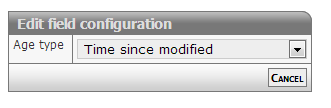
[Description of configs]
Developer info
- FeltTypeID: 84
- SQL datatype: N/A
- Class name: FieldCalcAge
Calc: Time measured
Total waiting time
Properties
- Type: Complex
- Groupable: No
- Show in lists: Yes
- Searchable: Yes
User interface
Field in show mode
[INSERT IMAGE]
Due to its nature this field has no special editing mode.
Configuration

[Description of configs]
Developer info
- FeltTypeID: 85
- SQL datatype: N/A
- Class name: FieldCalcMeasure
Calc: Score interval
Translation of values in intervals
Properties
- Type: Complex
- Groupable: No
- Show in lists: Yes
- Searchable: Yes
User interface
Field in show mode
[INSERT IMAGE]
Due to its nature this field has no special editing mode.
Configuration

[Description of configs]
Developer info
- FeltTypeID: 88
- SQL datatype: DECIMAL(20,4)
- Class name: FieldCalcScore
Calc: Check fields
Check if a list of fields has been filled out
Properties
- Type: Complex
- Groupable: No
- Show in lists: Yes
- Searchable: Yes
User interface
Field in show mode
[INSERT IMAGE]
Due to its nature this field has no special editing mode.
Configuration

[Description of configs]
Developer info
- FeltTypeID: 89
- SQL datatype: TINYINT(1)
- Class name: FieldCalcTestMany
Comments
Entry of a list of comments from the users of the case
Properties
- Type: Complex
- Groupable: No
- Show in lists: No
- Searchable: No
User interface
Field in show mode

Field in edit mode

Configuration
[INSERT IMAGE]
[Description of configs]
Developer info
- FeltTypeID: 140
- SQL datatype: INT(11)
- Class name: FieldComplexComment
Related form multiselect
Filter with single parameters including standard security.
Properties
- Type: Complex
- Groupable: No
- Show in lists: Yes
- Searchable: Yes
- Requires configuration: Yes
User interface
Field in show mode

Field in edit mode
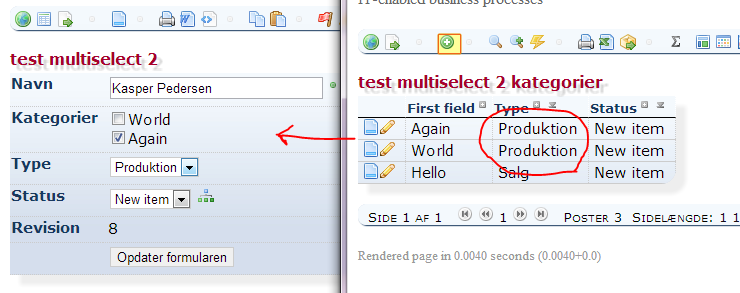
Configuration

[Description of configs]
Special features
There is automatically added a special JS function named: getValueDisplay + [FieldSystemName]
- The function returns a comma seperated list of display values.
- The function is only referable clientside.
Example for displaying the values selected in the field "My statements" (System name ="STATEMENTS"):
alert('You have selected the following values ' + getValueDisplaySTATEMENTS());Developer info
- FeltTypeID: 230
- SQL datatype: INT(11)
- Class name: FieldMultiSelectSubform
Related form multiselect SQL
Freeform definition with multiple parameters with optional security.
Properties
- Type: Complex
- Groupable: No
- Show in lists: Yes
- Searchable: Yes
- Requires configuration: Yes
User interface
Field in show mode

Field in edit mode

Configuration
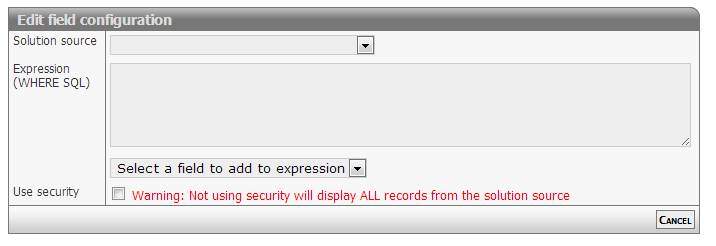
[Eventuel beskrivelse af configs]
Developer info
- FeltTypeID: 231
- SQL datatype: INT(11)
- Class name: FieldMultiSelectSubformSQL
XML data
XML data in lists, table or own output format
Properties
- Type: Complex
- Groupable: No
- Show in lists: No
- Searchable: No
- Requires configuration: Yes
User interface
Field in show mode
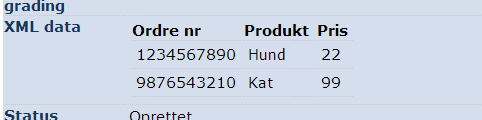
Field in edit mode
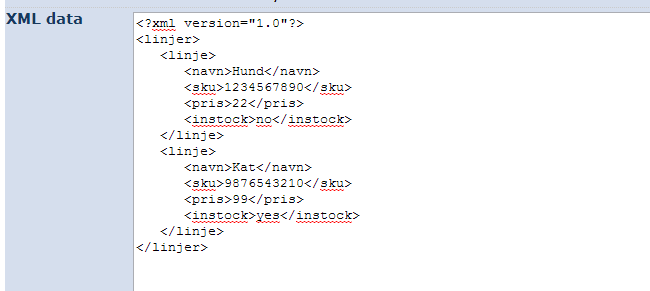
Configuration
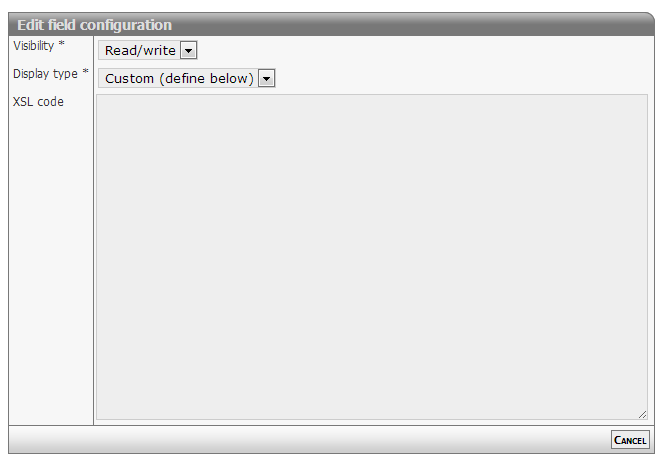
[Description of configs]
Developer info
- FeltTypeID: 400
- SQL datatype: LONGTEXT
- Class name: FieldXmlData
Barcode (status change)
Barcode to change status automatically
Properties
- Type: Complex
- Groupable: No
- Show in lists: No
- Searchable: No
User interface
Field in show mode
[INSERT IMAGE]
Field in edit mode
[INSERT IMAGE]
Configuration
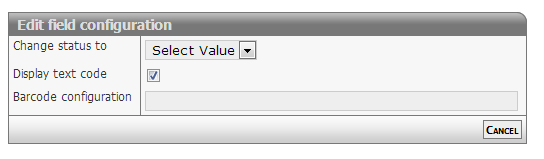
[Description of configs]
Developer info
- FeltTypeID: 651
- SQL datatype: N/A
- Class name: FieldBarcodeAutomation
SQL: Table query
[DESCRIPTION]
Properties
- Type: Complex
- Groupable: [YES/NO]
- Show in lists: [YES/NO]
- Searchable: [YES/NO]
User interface
Field in show mode
[INSERT IMAGE]
Field in edit mode
[INSERT IMAGE]
Configuration
[INSERT IMAGE]
[Eventuel beskrivelse af configs]
Developer info
- FeltTypeID: 520
- SQL datatype: N/A
- Class name: FieldSqlData
Calc: Flag
[DESCRIPTION]
Properties
- Type: Complex
- Groupable: [YES/NO]
- Show in lists: [YES/NO]
- Searchable: [YES/NO]
User interface
Field in show mode
[INSERT IMAGE]
Field in edit mode
[INSERT IMAGE]
Configuration
[INSERT IMAGE]
[Eventuel beskrivelse af configs]
Developer info
- FeltTypeID: 180
- SQL datatype: TINYINT(1)
- Class name: FieldCalcTestFlag
Related entity multiline decimal
A table of lines from another table, maybe with a filter that relates them to this items DataID, and the option to input a decimal number next to each of them.
Properties
- Type: Complex
- Groupable: No
- Show in lists: No
- Searchable: No
User interface
Field in show mode
[INSERT IMAGE]
Field in edit mode
[INSERT IMAGE]
Configuration
[INSERT IMAGE]
This field requires configuration of both parameters before it shows.
Config1
The SQL-query executed, to list the items in the table.
The first column should be *DataID* of the subitem, but it doesn't have to be. As long as *a* column includes this data.
To relate the subtable to the current item, ad a *where clause* comparing to *[DataID]*, where *[DataID]* will be replaced be the current records DataID.
Config2
The Label of the input column in the table.
Developer info
- FeltTypeID: 232
- SQL datatype: INT(11)
- Class name: FieldMultiInputSubformListSQL
Token display
[DESCRIPTION]
Properties
- Type: Complex
- Groupable: [YES/NO]
- Show in lists: [YES/NO]
- Searchable: [YES/NO]
User interface
Field in show mode
[INSERT IMAGE]
Field in edit mode
[INSERT IMAGE]
Configuration
[INSERT IMAGE]
[Eventuel beskrivelse af configs]
Developer info
- FeltTypeID: 760
- SQL datatype: N/A
- Class name: FieldTokenShow
Calc: Document section
[DESCRIPTION]
Properties
- Type: Complex
- Groupable: [YES/NO]
- Show in lists: [YES/NO]
- Searchable: [YES/NO]
User interface
Field in show mode
[INSERT IMAGE]
Field in edit mode
[INSERT IMAGE]
Configuration
[INSERT IMAGE]
[Eventuel beskrivelse af configs]
Developer info
- FeltTypeID: 2085
- SQL datatype: N/A
- Class name: FieldCalcDocumentSection
Geomap Coding
[DESCRIPTION]
Properties
- Type: Complex
- Groupable: [YES/NO]
- Show in lists: [YES/NO]
- Searchable: [YES/NO]
User interface
Field in show mode
[INSERT IMAGE]
Field in edit mode
[INSERT IMAGE]
Configuration
[INSERT IMAGE]
[Eventuel beskrivelse af configs]
Developer info
- FeltTypeID: 2201
- SQL datatype: VARCHAR(80)
- Class name: FieldGeoAddressCoding
Geomap
[DESCRIPTION]
Properties
- Type: Complex
- Groupable: [YES/NO]
- Show in lists: [YES/NO]
- Searchable: [YES/NO]
User interface
Field in show mode
[INSERT IMAGE]
Field in edit mode
[INSERT IMAGE]
Configuration
[INSERT IMAGE]
[Eventuel beskrivelse af configs]
Developer info
- FeltTypeID: 2200
- SQL datatype: DECIMAL(10,6)
- Class name: FieldGeoLocation