Files
- Package name: files
- Documents
- Pictures
- Videos
- Document builder
- Filesystem files
- Documents with Signing
- Value copy (files)
- Filesystem with FTP
- Documents to append
- Build remote files reference list
- Build document from structure
- Append remote files
Documents
Upload / download of files including versioning
Note that a class is added to the page while uploading ressources: uploadInProgress
In case you want to prevent the user presing update, the buttons can be hided with this CSS
.uploadInProgress .tsUpdateButtons { display: none; }Properties
- Type: Files
- Groupable: No
- Show in lists: Yes
- Searchable: Yes
User interface
Field in show mode

Field in edit mode

Reacting to uploads
The platform sends out custom triggers on upload start, finish and failure.
To react to these, use the following example
$(".custom-file-input").on("TS_UploadStart", () => {
  // React
})
$(".custom-file-input").on("TS_UploadFinished", () => {
  // React
})
$(".custom-file-input").on("TS_UploadFailed", () => {
  // React
})
Configuration
[INSERT IMAGE]
[Description of configs]
Developer info
- FeltTypeID: 50
- SQL datatype: INT(11)
- Class name: FieldFiles
Pictures
Photo gallery with thumbnail index and optional lightbox to view full size images
Properties
- Type: Files
- Groupable: No
- Show in lists: Yes
- Searchable: No
User interface
Field in show mode
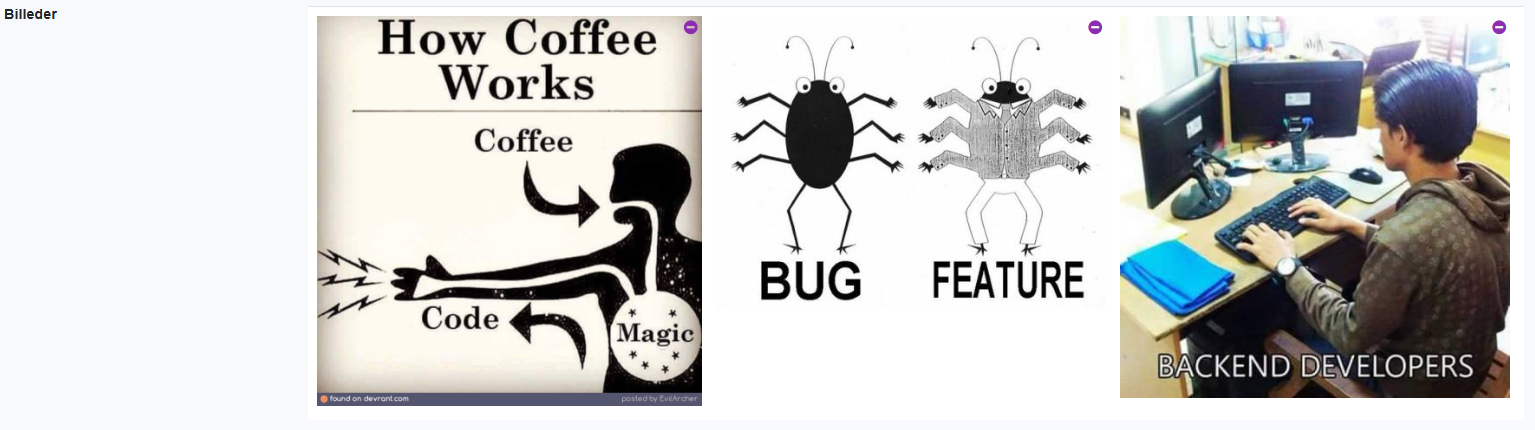
Field in edit mode
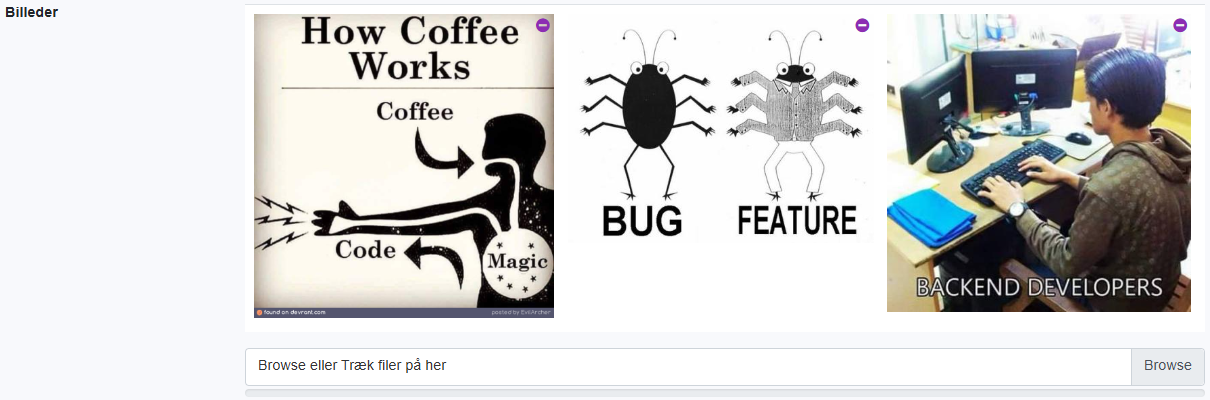
Configuration
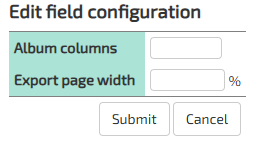
Config1: Number of columns, default is 4
Config2: Export width, default is 40%
Config3: Enable lightbox, default is 0 (off)
Developer info
- FeltTypeID: 51
- SQL datatype: INT(11)
- Class name: FieldFilesPictures
Videos
Video gallery with thumbnails and player.
The video-player only works when Policy filesystemStorageActive.
To enable down-scaling to 720p and 1080p, the storage has to be on AWS S3, and the Encoding Lambda-function has to be enabled.
As of version 11572 the thumbnail engine was changed to FFmpeg.
Servers updated to this version, or newer, have to manually download the appropriate FFmpeg jar and place it in the tomcat-libs folder.
The version of FFmpeg downloaded must be 7.1-1.5.11.
As of version 12587, the version should be 6.0-1.5.9.
Servers installed via the ts-script, after jan 23. 2026 will already have this jar file as part of the default setup.
Properties
- Type: Files
- Groupable: No
- Show in lists: No
- Searchable: No
User interface
Field in show mode

Field in edit mode

Configuration

[Description of configs]
Config1: Number of columns, default is 3
Config2: Not used
Config3: Not used
Developer info
- FeltTypeID: 52
- SQL datatype: INT(11)
- Class name: FieldFilesVideos
Document builder
Build document based on solution file template
Properties
- Type: Files
- Groupable: No
- Show in lists: No
- Searchable: No
User interface
Field in show mode
[INSERT IMAGE]
Field in edit mode
[INSERT IMAGE]
Configuration

[Description of configs]
Developer info
- FeltTypeID: 53
- SQL datatype: INT(11)
- Class name: FieldFilesGenerate
Filesystem files
Download of local files on the intranet
Properties
- Type: Files
- Groupable: No
- Show in lists: No
- Searchable: No
User interface
Field in show mode

Field in edit mode
[INSERT IMAGE]
Configuration

[Description of configs]
Developer info
- FeltTypeID: 55
- SQL datatype: Special
- Class name: FieldFilesShared
Documents with Signing
Upload / download of files including versioning and DocuSign integration, with upload-action and sign-status.
Properties
- Type: Files
- Groupable: No
- Show in lists: Yes
- Searchable: Yes
User interface
Field in show mode

Field in edit mode

Configuration
[INSERT IMAGE]
The DocuSign Integration should be configured, otherwise this field is the same as Files: Documents
Developer info
- FeltTypeID: 57
- SQL datatype: INT(11)
- Class name: FieldFilesSigning
Value copy (files)
[DESCRIPTION]
Properties
- Type: Files
- Groupable: [YES/NO]
- Show in lists: [YES/NO]
- Searchable: [YES/NO]
User interface
Field in show mode
[INSERT IMAGE]
Field in edit mode
[INSERT IMAGE]
Configuration
[INSERT IMAGE]
[Eventuel beskrivelse af configs]
Developer info
- FeltTypeID: 617
- SQL datatype: N/A
- Class name: FieldReplicateFiles
Filesystem with FTP
[DESCRIPTION]
Properties
- Type: Files
- Groupable: [YES/NO]
- Show in lists: [YES/NO]
- Searchable: [YES/NO]
User interface
Field in show mode
[INSERT IMAGE]
Field in edit mode
[INSERT IMAGE]
Configuration
[INSERT IMAGE]
[Eventuel beskrivelse af configs]
Developer info
- FeltTypeID: 56
- SQL datatype: N/A
- Class name: FieldFilesSharedFtp
Documents to append
[DESCRIPTION]
Properties
- Type: Files
- Groupable: [YES/NO]
- Show in lists: [YES/NO]
- Searchable: [YES/NO]
User interface
Field in show mode
[INSERT IMAGE]
Field in edit mode
[INSERT IMAGE]
Configuration
[INSERT IMAGE]
[Eventuel beskrivelse af configs]
Developer info
- FeltTypeID: 2150
- SQL datatype: INT(11)
- Class name: FieldFilesAssembler
Build remote files reference list
[DESCRIPTION]
Properties
- Type: Files
- Groupable: [YES/NO]
- Show in lists: [YES/NO]
- Searchable: [YES/NO]
User interface
Field in show mode
[INSERT IMAGE]
Field in edit mode
[INSERT IMAGE]
Configuration
[INSERT IMAGE]
[Eventuel beskrivelse af configs]
Developer info
- FeltTypeID: 2152
- SQL datatype: N/A
- Class name: FieldFilesReferenceListBuilder
Build document from structure
[DESCRIPTION]
Properties
- Type: Files
- Groupable: [YES/NO]
- Show in lists: [YES/NO]
- Searchable: [YES/NO]
User interface
Field in show mode
[INSERT IMAGE]
Field in edit mode
[INSERT IMAGE]
Configuration
[INSERT IMAGE]
[Eventuel beskrivelse af configs]
Developer info
- FeltTypeID: 2153
- SQL datatype: N/A
- Class name: FieldFilesStructureAssembler
Append remote files
[DESCRIPTION]
Properties
- Type: Files
- Groupable: [YES/NO]
- Show in lists: [YES/NO]
- Searchable: [YES/NO]
User interface
Field in show mode
[INSERT IMAGE]
Field in edit mode
[INSERT IMAGE]
Configuration
[INSERT IMAGE]
[Eventuel beskrivelse af configs]
Developer info
- FeltTypeID: 2151
- SQL datatype: N/A
- Class name: FieldLookupRecordAssembler