Lookup
- Package name: lookup
- Lookup
- Lookup (shared)
- User
- User Exclusive
- Group
- Dependent list (lokal)
- Dependent category
- List replica
- Lookup: Currency code
- Variant selector
- Database: Opslag indtastning
- Database: Opslag liste valg
- SQL: Subselect
- Lookup: Data item
- Lookup: Data item nested
- Value copy
- Value copy (text)
- Value copy (Integer)
- Value copy (decimal)
- Value copy (yes/no)
- Value copy (date)
- Value copy (cpr)
- Dependent list replica
Lookup
Look-up in local list of values
Properties
- Type: Lookup
- Groupable: Yes
- Show in lists: Yes
- Searchable: Yes
User interface
Field in show mode

Field in edit mode

Configuration
This field requires configuration before deployment.

[Description of configs]
Developer info
- FeltTypeID: 61
- SQL datatype: INT(11)
- Class name: FieldLookupListLocal
Lookup (shared)
Look-up in common list of values
Properties
- Type: Lookup
- Groupable: Yes
- Show in lists: Yes
- Searchable: Yes
User interface
Field in show mode

Field in edit mode

Configuration
This field requires configuration before deployment.
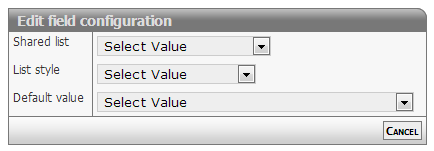
[Description of configs]
Developer info
- FeltTypeID: 60
- SQL datatype: INT(11)
- Class name: FieldLookupListShare
User
Users of the system. Those who are being added, can as an option be notified
Properties
- Type: Lookup
- Groupable: Yes
- Show in lists: Yes
- Searchable: Yes
User interface
Field in show mode

Field in edit mode

Configuration
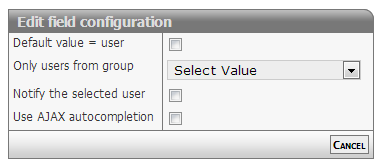
[Description of configs]
Developer info
- FeltTypeID: 63
- SQL datatype: INT(11)
- Class name: FieldLookupUser
User Exclusive
User from a certain Exclusive group (the one set on the record)
Properties
- Type: Lookup
- Groupable: Yes
- Show in lists: Yes
- Searchable: Yes
User interface
Field in show mode

Field in edit mode

Configuration
No configuration required for this field type
To set the current user as the default value, manually edit the field and input USER as the default value.
Developer info
- FeltTypeID: 163
- SQL datatype: INT(11)
- Class name: FieldLookupUserExclusive
Group
Groups in the system. Those who are being added, can as an option be notified
Properties
- Type: Lookup
- Groupable: Yes
- Show in lists: Yes
- Searchable: Yes
User interface
Field in show mode

Field in edit mode

Configuration
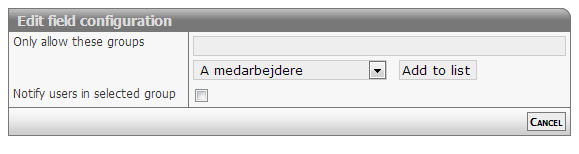
[Description of configs]
Developer info
- FeltTypeID: 64
- SQL datatype: INT(11)
- Class name: FieldLookupGroup
Dependent list (lokal)
Choice based on another local list
Properties
- Type: Lookup
- Groupable: Yes
- Show in lists: Yes
- Searchable: Yes
User interface
Field in show mode
[INSERT IMAGE]
Field in edit mode
[INSERT IMAGE]
Configuration

[Description of configs]
Developer info
- FeltTypeID: 71
- SQL datatype: INT(11)
- Class name: FieldLookupListLocalNested
Dependent category
Categories based on value
Properties
- Type: Lookup
- Groupable: Yes
- Show in lists: Yes
- Searchable: Yes
User interface
Field in show mode
[INSERT IMAGE]
Field in edit mode
[INSERT IMAGE]
Configuration

[Description of configs]
Developer info
- FeltTypeID: 72
- SQL datatype: INT(11)
- Class name: FieldCategory
List replica
Copy of another list (same options)
Properties
- Type: Lookup
- Groupable: No
- Show in lists: Yes
- Searchable: Yes
User interface
Field in show mode
[INSERT IMAGE]
Field in edit mode
[INSERT IMAGE]
Configuration
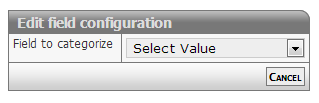
[Description of configs]
Developer info
- FeltTypeID: 73
- SQL datatype: INT(11)
- Class name: FieldLookupListLocalReplika
Lookup: Currency code
List of currency codes
Properties
- Type: Lookup
- Groupable: Yes
- Show in lists: Yes
- Searchable: Yes
User interface
Field in show mode
[INSERT IMAGE]
Field in edit mode
[INSERT IMAGE]
Configuration
No configuration required for this field type
Developer info
- FeltTypeID: 95
- SQL datatype: VARCHAR(3)
- Class name: FieldLookupStaticCurrency
Variant selector
List of types, which are controlling which other boxes are being showed
Properties
- Type: Lookup
- Groupable: Yes
- Show in lists: Yes
- Searchable: No
- Requires configuration: Yes
User interface
Field in show mode
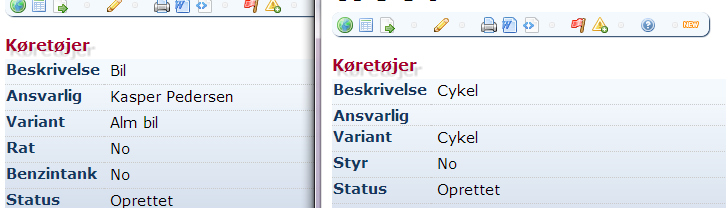
Field in edit mode
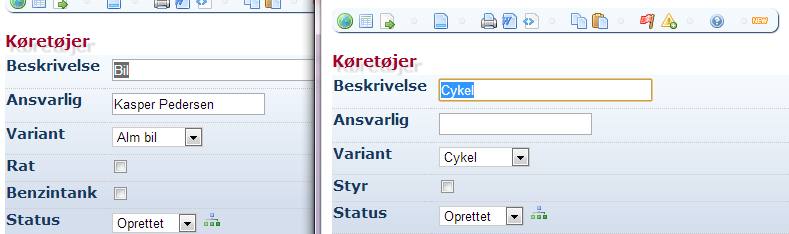
Configuration
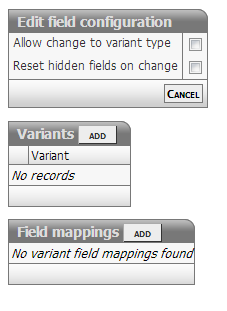
[Description of configs]
Developer info
- FeltTypeID: 300
- SQL datatype: INT(11)
- Class name: FieldVariant
Database: Opslag indtastning
Look-up of values in foreign database
Properties
- Type: Lookup
- Groupable: No
- Show in lists: Yes
- Searchable: Yes
- Requires configuration: Yes
User interface
Field in show mode
[INSERT IMAGE]
Field in edit mode
[INSERT IMAGE]
Configuration

[Description of configs]
Developer info
- FeltTypeID: 500
- SQL datatype: VARCHAR(20)
- Class name: FieldRemoteKey
Database: Opslag liste valg
Table of values from foreign database
Properties
- Type: Lookup
- Groupable: No
- Show in lists: Yes
- Searchable: Yes
- Requires configuration: Yes
User interface
Field in show mode
[INSERT IMAGE]
Field in edit mode
[INSERT IMAGE]
Configuration
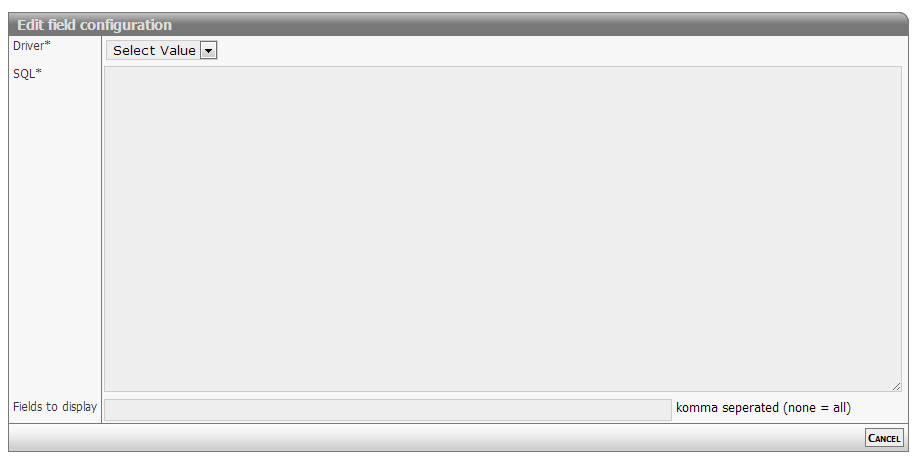
[Description of configs]
Developer info
- FeltTypeID: 501
- SQL datatype: VARCHAR(20)
- Class name: FieldRemoteKeyLookup
SQL: Subselect
Enquiry in own or foreign database
Properties
- Type: Lookup
- Groupable: No
- Show in lists: Yes
- Searchable: Yes
- Requires configuration: Yes
User interface
Field in show mode
[INSERT IMAGE]
Due to its nature this field has no special editing mode.
Configuration

Required:
- SELECT query that returns a single record with a single value in the recordset
Options:
- Restrictions (when to display the value):
- Always: Single, list and subitem mode
- Items: Single mode only (hidden in list mode)
- Lists: List mode only (hidden in single mode)
- Subitem: Lists displayed in single items (child records)
Notes for usage:
- Values are not cached or stored
- Consider activating INDEX for fields used in WHERE or JOIN clauses
Configuration example 1
Solution setup
Solution "Child items" (system name: "testchild")
* Relation field "owner" (system name: "PARENT").

Solution: "Parent items" (system name: "testparent")
* Date field "starting date" (system name: "DATO")
Business requirement
Display the starting date (system name: "DATO") from the related parent table, linked by the local field owner (system name: "PARENT").
Subselect SQL statement
SELECT DATO
FROM data_testparent
WHERE :PARENT = data_testparent.DataID
this is the shorthand version for
...
WHERE data_testchild.PARENT = data_testparent.DataID
Configuration example 2
Solution setup
Solution "Example" (system name: "example")
* Status log activated
Business requirement
Display the number of state changes for a data item
Subselect SQL statement
SELECT CONCAT( COUNT(*), ' transitions')
FROM data_example_statuslog
WHERE data_example_statuslog.DataID = :DataID
this is the shorthand version for
...
WHERE data_example_statuslog.DataID = data_example.DataID
Developer info
- FeltTypeID: 510
- SQL datatype: N/A
- Class name: FieldSubselect
Lookup: Data item
Create reference to another record. This works the same as the field "Parent reference", but creates a drop-down list of options instead of using auto-complete. Useful for when there isn't a vast amount of records to select from. This field must be used for Lookup: Data item nested to work.
Properties
- Type: Lookup
- Groupable: No
- Show in lists: Yes
- Searchable: Yes
User interface
Field in show mode
[INSERT IMAGE]
Field in edit mode
[INSERT IMAGE]
Configuration
This field requires configuration before deployment.
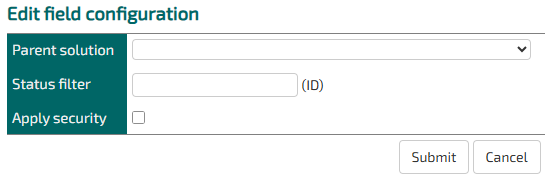
Parent solution: Choose which entity the parent record will be chosen from.
Status filter: Optionally, you can specify a StatusID of a single status in the parent entity that all the record options should have.
Apply security: If this is not checked, then records will show up in the dropdown even if the user does not have permission to read them.
Developer info
- FeltTypeID: 561
- SQL datatype: INT(11)
- Class name: FieldLookupListRecordKey
Lookup: Data item nested
Used when you want to limit the options from a regular "Lookup: Data item" field to only the ones that share a parent with this entity.
Properties
- Type: Lookup
- Groupable: No
- Show in lists: Yes
- Searchable: Yes
User interface
Field in show mode
[INSERT IMAGE]
Field in edit mode
[INSERT IMAGE]
Configuration
This field requires configuration before deployment.
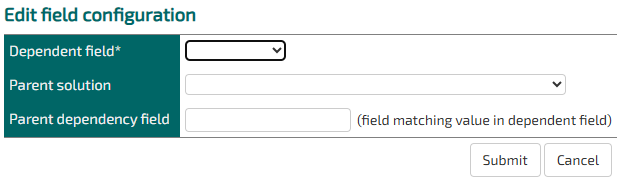
Dependent Field: The field in this entity that references the shared parent.
Parent Solution: The lookup options entity.
Parent dependency field: The field in the lookup options entity that references the shared parent.
Developer info
- FeltTypeID: 571
- SQL datatype: INT(11)
- Class name: FieldLookupListRecordKeyNested
Value copy
Showing other values based on a key
Properties
- Type: Lookup
- Groupable: No
- Show in lists: Yes
- Searchable: Yes
- Requires configuration: Yes
User interface
Field in show mode
[INSERT IMAGE]
Due to its nature this field has no special editing mode.
Configuration

[Description of configs]
Developer info
- FeltTypeID: 610
- SQL datatype: N/A
- Class name: FieldReplicate
Value copy (text)
Coping TEXT value based on key (searchable)
Properties
- Type: Lookup
- Groupable: No
- Show in lists: Yes
- Searchable: Yes
- Requires configuration: Yes
User interface
Field in show mode
[INSERT IMAGE]
Due to its nature this field has no special editing mode.
Configuration

[Description of configs]
Developer info
- FeltTypeID: 611
- SQL datatype: N/A
- Class name: FieldReplicateText
Value copy (Integer)
Coping DECIMAL value based on key (searchable)
Properties
- Type: Lookup
- Groupable: No
- Show in lists: Yes
- Searchable: Yes
- Requires configuration: Yes
User interface
Field in show mode
[INSERT IMAGE]
Due to its nature this field has no special editing mode.
Configuration
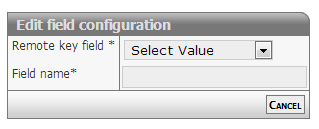
[Description of configs]
Developer info
- FeltTypeID: 612
- SQL datatype: INT(11)
- Class name: FieldReplicateInteger
Value copy (decimal)
Coping DECIMAL value based on key (searchable)
Properties
- Type: Lookup
- Groupable: No
- Show in lists: Yes
- Searchable: Yes
- Requires configuration: Yes
User interface
Field in show mode
[INSERT IMAGE]
Due to its nature this field has no special editing mode.
Configuration

[Description of configs]
Developer info
- FeltTypeID: 613
- SQL datatype: DECIMAL(20,4)
- Class name: FieldReplicateDecimal
Value copy (yes/no)
Coping Yes/No values based on key (searchable)
Properties
- Type: Lookup
- Groupable: No
- Show in lists: Yes
- Searchable: Yes
- Requires configuration: Yes
User interface
Field in show mode
[INSERT IMAGE]
Due to its nature this field has no special editing mode.
Configuration
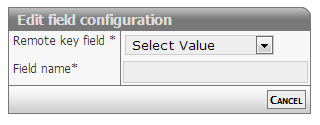
[Description of configs]
Developer info
- FeltTypeID: 614
- SQL datatype: TINYINT(1)
- Class name: FieldReplicateBoolean
Value copy (date)
Coping DATE values based on key (searchable)
Properties
- Type: Lookup
- Groupable: No
- Show in lists: Yes
- Searchable: Yes
- Requires configuration: Yes
User interface
Field in show mode
[INSERT IMAGE]
Due to its nature this field has no special editing mode.
Configuration

[Description of configs]
Developer info
- FeltTypeID: 615
- SQL datatype: DATE
- Class name: FieldReplicateDate
Value copy (cpr)
Coping CPR number based on key (searchable)
Properties
- Type: Lookup
- Groupable: No
- Show in lists: Yes
- Searchable: Yes
- Requires configuration: Yes
User interface
Field in show mode
[INSERT IMAGE]
Due to its nature this field has no special editing mode.
Configuration

[Description of configs]
Developer info
- FeltTypeID: 616
- SQL datatype: VARCHAR(20)
- Class name: FieldReplicateCPR
Dependent list replica
Copy field lookup options from another field in this solution
Properties
- Type: Lookup
- Groupable: [YES/NO]
- Show in lists: [YES/NO]
- Searchable: [YES/NO]
User interface
Field in show mode
[INSERT IMAGE]
Field in edit mode
[INSERT IMAGE]
Configuration
[INSERT IMAGE]
[Eventuel beskrivelse af configs]
Developer info
- FeltTypeID: 74
- SQL datatype: INT(11)
- Class name: FieldLookupListLocalNestedReplika