# Calc: Formula
Formula based on other fields
### Properties
- Type: [Complex](https://docs.tsnocode.com/books/field-type-reference/chapter/complex)
- Groupable: No
- Show in lists: Yes
- Searchable: Yes
- Requires configuration: Yes
## User interface
Field in show mode
[](https://docs.tsnocode.com/uploads/images/gallery/2025-07/wMImTzYq1PdGt51W-image.png)
Due to its nature this field has no special editing mode.
## Configuration
[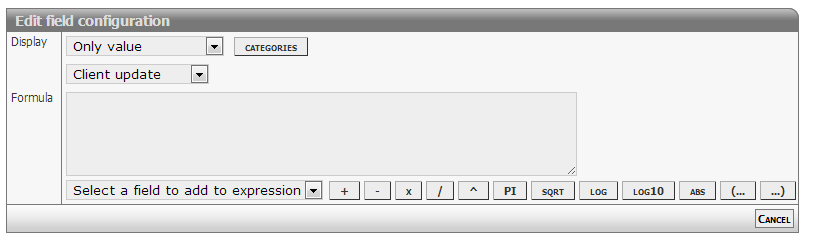](https://docs.tsnocode.com/uploads/images/gallery/2025-07/J52Y5dH3Qrf48T3P-image.png)
\[Description of configs\]
### Complex formulas
Calculated formulas syntax follows is compliant with JavaScript syntax.
#### Common operators
- Add: +
- Subtract: -
- Division: /
- Multiply: \*
- Modulus: %
- Precedence: ( ... )
#### Mathematical functions
- Absolute: abs
- Minimum: max
- Maximum: min
- Power: pow
- Square root: sqrt
- Logarithms: log log10 exp
- Rounding: ceil floor round
#### Mathematical constants
- Pi: pi
- E: e
#### Support for statements
This feature is enabled starting from version 2366.
##### IF statement
Syntax used matches JavaScript inline IF statements.
To make the statement work make sure to add a space or linebreak before `)`, after `(`, before and after `?` and `:`.
Linebreaks get replaced with a space, before evaluation.
```
( Value1 Operator Value2 ? ValueIfTrue : ValueIfFalse )
```
- Test
- First value or expression
- Operator
- Equal: =
- Unequal: !=
- Greater: > (>=)
- Lesser: < (<=)
- Second value or expression
- Result
- TRUE value or expression
- FALSE value or expression
##### Logical AND and OR
This syntax is not implemented.
It will maybe evaluate, but then fail.
If you need to chain comparisons, you have to do it like this:
```javascript
( 172 == 172 && 1 == 1 && 60910 == 60910 ? 0 : 1 )
// Equals
( 172 == 172 ? ( 1 == 1 ? ( 60910 == 60910 ? 0 : 1 ) : 1 ) : 1 )
// Equals
( 172 == 172
? ( 1 == 1
? ( 60910 == 60910
? 0
: 1
)
: 1
)
: 1
)
```
##### Quirks
As it can be seen in the samples here, a lot of extra spaces are required.
The extra space after an opening parentheses, the one before a closing paretheses, the ones aroung a question mark or colon.
All of those are needed in the current implementation.
##### Examples
Script code / specification
```javascript
var result;
if ( [NUMBER1] > [NUMBER2] ) {
result = [NUMBER1] * 11;
} else {
result = [NUMBER3];
}
return result;
```
Expression to use in formula
```
( [NUMBER1] > [NUMBER2] ? [NUMBER1] * 11 : [NUMBER3] )
```
## Developer info
- FeltTypeID: 81
- SQL datatype: DECIMAL(20,4)
- Class name: FieldCalcFormula