Date
Date with calendar look-up
Properties
- Type: Basic
- Groupable: Yes
- Show in lists: Yes
- Searchable: Yes
- Requires configuration: No
User interface
Field in show mode

Field in edit mode

Configuration
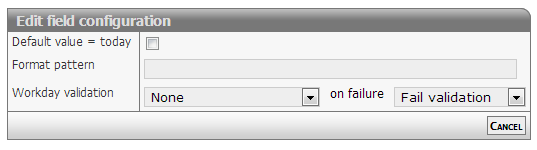
Show mode
The date will be formatted as defined in format option.
Default formatting is: dd/mm/yyyy
Edit mode
The date field will display a textbox. On activating the field a date selector will popup below the field.
Normal input format is: dd/mm/yyyy
The values for dd and mm can be either 1 or two digits - examples
- 1/12/2013 or 01/12/2013
- 31/1/2013 or 31/01/2013
The separator method is also free: "/" or "-" will do
Relative date
The date output can be changed to output the number of dates between the stored date and "now".
To do this input two colors, separated by a space, in the formatting config.
eg. red green.
This will change the list-output of the field to be a number of days.
If the number is negative, the date is in the past, if it is positive the date is in the future.
The two colors chosen will be be added as text-colors.
Other options
The date field can be set to strict or loose date parsing:
- Strict: Only the correct date format supplied by the date selector dd/mm/yyyy
- Loose: Interpretation of all values
- 31/12 > 31/12/[this year]
- 311213 > 31/12/2013
- 30 > [30 days from now]
- -7 > [7 days ago from now]
The loose option is activated by setting the configuration (policy): doSmartDateInput
Styling relative dates
As of version 11476.
The relative date output has the class relativeDate and depending on wether the date is before or after now, it has the class before or after.
To spice up the style of this output, you can add this snippit to your stylesheet.
.relativeDate.after {
    color: #096f58 !important;
    background: #7efbb7;
    padding: 0px 5px;
    border-radius: 3px;
}

.relativeDate.before {
    color: #a7175f !important;
    background: #ffc9d3;
    padding: 0px 5px;
    border-radius: 3px;
}
To limit the styling to a singe entity, add the style in the headers and scripts for that entity.
Developer info
- FeltTypeID: 20
- SQL datatype: DATE
- Class name: FieldTimeDate