# Lookup: Data item
Create reference to another record. This works the same as the field "Parent reference", but creates a drop-down list of options instead of using auto-complete. Useful for when there isn't a vast amount of records to select from. This field must be used for [Lookup: Data item nested](https://docs.tsnocode.com/books/field-type-reference/page/lookup-data-item-nested) to work.
### Properties
- Type: [Lookup](https://docs.tsnocode.com/books/field-type-reference/chapter/lookup)
- Groupable: No
- Show in lists: Yes
- Searchable: Yes
## User interface
Field in show mode
\[INSERT IMAGE\]
Field in edit mode
\[INSERT IMAGE\]
## Configuration
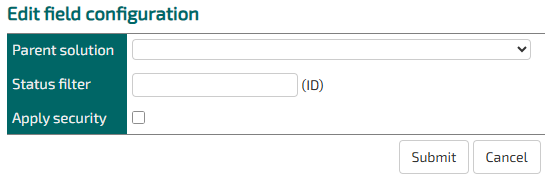
This field requires configuration before deployment.
[](https://docs.tsnocode.com/uploads/images/gallery/2025-08/zRkLzNrnhCC0U3rI-image.png)
Parent solution: Choose which entity the parent record will be chosen from.
Status filter: Optionally, you can specify a StatusID of a single status in the parent entity that all the record options should have.
Apply security: If this is not checked, then records will show up in the dropdown even if the user does not have permission to read them.
## Developer info
- FeltTypeID: 561
- SQL datatype: INT(11)
- Class name: FieldLookupListRecordKey