JavaScript functions
Frontend API for tweaking interface behavior
- Code placement
- Built-in functions
- Get and set values
- Toggling fields (5478+)
- Toggling status
- Binding to events (6734+)
- Value dependencies
- Value triggers
- Value lookups
- Named queries
- Inspect command and users
- Other functions
- Adding a QR/Barcode scanner to a field
- Control variables
- Hacking dependent values
Code placement
The following places can contain JS code
- Entity header
- Entity status
- JavaScript field
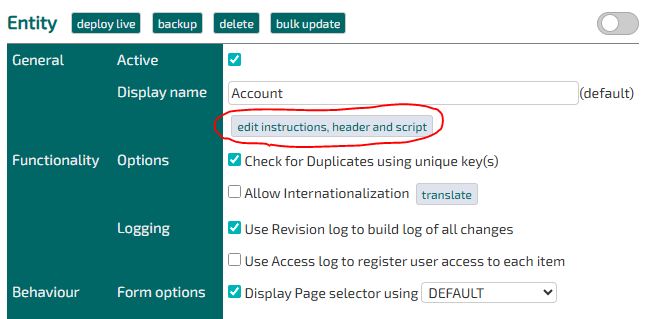
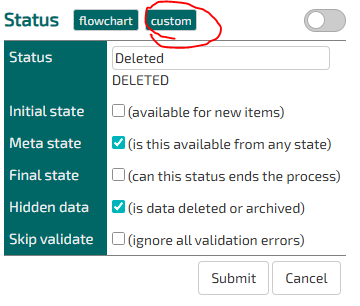
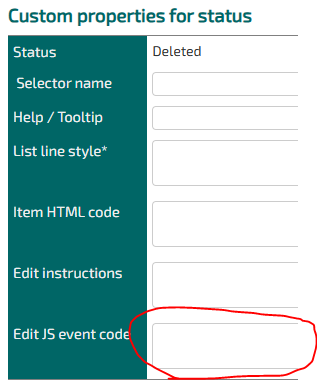
Additionally HTML with inline script can be placed in
- Wrapper
- Template
Finally expressions can be evaluated using
- Entity field dependency
Built-in functions
The following functions are only available for single item views (edit or show).
Get and set values
Display values are handled using standard getter and setters
- getValue(fieldName)
- setValue(fieldName,value)
Example
let a = getValue("NUMBER1");
let b = getValue("NUMBER2");
setValue( "RESULT", (a-b) );
For explicitly getting a value (or ID) use
- getDecimal(fieldName)
Example
let recordId = getDecimal("SELECTRECORD");For explicitly getting a datetime use
- getFieldTime(fieldName)
Example
const time = new Date(getFieldTime('DEADLINE'));Toggling fields (5478+)
Note: Hide functions are NOT intended for denying access to data -it will only be hidden in the frontend, but is still accessible to savvy users.
Fields can be shown or hidden calling the fieldname
- hideField(fieldName)
- showField(fieldName)
Examples
hideField("USER");
hideField("StatusID");
Dependent toggling
Hiding and showing fields can be made dependent on classes in the TempusServaPage
- hideFieldForPageClass(fieldName,className)
- showFieldForPageClass(fieldName,className)
Hiding and showing fields can be made dependent on items current status.
- hideFieldForStatusId(fieldName,statusId)
- showFieldForStatusId(fieldName,statusId)
Hiding and showing fields can be made dependent on classes in the TempusServaPage AND items current status.
- hideFieldForPageClassAndStatusId(fieldName,className,statusId)
- showFieldForPageClassAndStatusId(fieldName,className,statusId)
In case of advanced setup consider "hide for all first and show for some later". In this example NAME should only be displayed for a few status
hideField("NAME");
showFieldForStatusId("NAME",1234);
showFieldForStatusId("NAME",1235);
Disclaimer
The functions are the equivilant of JQuery
$("#VB_DATA_"+fieldName).parent().parent().hide();
$("#VB_DATA_"+fieldName).parent().parent().hide();
This means that fields are expected to be wrapped in TWO layers of html tags for the functions to work
Toggling status
You can use a Jquery expression.
$("#DATA_StatusID option[value='123']").remove();Binding to events (6734+)
The platform sends out events when a couple of events are performed. Code can be written to bind to these.
Events
hide-field, triggered when the platform hides a field (dependency or hideField-function)show-field, triggered when the platform shows a field (dependency or showField-function)
How to bind
$("tr").bind("hide-field", function(e) {
    // Do stuff..
})
Custom events
TS implements a couple of custom events, that you can bind your headers and scripts to.
Preparing Submit
When the platform i preparing to submit the form, first it fires the event TS_PrepareSubmitForm on #TempusServaPage.
You can bind to this event like this:
$('#TempusServaPage').on('TS_PrepareSubmitForm', () => {
  console.log('Preparing submit!')
})
Dynamic reload of fields
If the policy reloadParentFieldsOnClose is enabled (as of version 11355) when a child-record is submittet, the parent record i no longer reloaded, instead a reload is performed in the background, and the child-fields are replaced.
Once this task is performed the platform fires the event TS_RefreshFieldsFromServer on #TempusServaPage.
You can bind to this event like this:
$('#TempusServaPage').on('TS_RefreshFieldsFromServer', () => {
  console.log('child was submitted!')
})
Value dependencies
Using lookup select boxes you can set up complex dependencies between values. The target field will be filtered when the page loads and on all changes to the filter field(s).
Single dependency
lookupValueFilterOnChange(fieldNameTarget, fieldNameSource, tripleArrayOfConditions);var conditions = [
[ TargetValue, SourceValue ... ],
];var conditions = [
["Ding", "Foo"],
["Dong", "Foo"],
["Ding", "Bar"],
];
lookupValueFilterOnChange("LOOKUP", "FILTER", conditions);In the above "Ding" and "Dong" will be available to select when FILTER = "Foo"
Double dependency
lookupValueFilterDoubleOnChange(fieldNameTarget, fieldNameSource1, fieldNameSource2, tripleArrayOfConditions);var conditions = [
["Ding", "Foo", "Cat"],
["Dong", "Foo", "Dog"],
["Ding", "Bar", "Cat"],
["Dong", "Bar", "Fish"],
];
lookupValueFilterDoubleOnChange("LOOKUP", "FILTERA", "FILTERB", conditions);In the above "Ding" will be available to select when either :
- FILTERA = "Foo" -AND- FilterB = "Cat"
- FILTERA = "Bar" -AND- FilterB = "Cat"
Value triggers
Value triggers will make things happen when a field changes. Multiple triggers can be assigned to the same field.
- setValueOnChange(sourceName,targetName,targetValue)
- setValueOnSetValue(sourceName,sourceValue,targetName,targetValue)
Sets the value if another field is changed. Optionally only if a ceratain value is selected (sourceValue)
setValueOnChange("CATEGORY","Silver","StatusID","Customer changed")- warningOnChange(sourceName,message)
- warningOnSetValue(sourceName,sourceValue,message)
Display a warning to a user if another field is changed. Optionally only if a ceratain value is selected (sourceValue)
Value lookups
Value lookups will copy values from other records to the current one. The normal usecase is records referring other records via parent references.
- getValueFromLookup(SourceSagID,SourceDataID,FieldNameSource)
- setValueFromLookup(SourceSagID,SourceDataID,FieldNameSource,FieldNameTarget)
The function will
- Make a call to ?SagID=[SagID]&DataID=[DataID]&command=show
- Pickup the value in the page at #VB_DATA_[FieldNameSource]
- Insert the value in the local field FieldNameTarget
The DataID on the remote record can be picked up automatically by specifying FieldNameTrigger. Note this will only work as long as the trigger field is in editable and the value is changed.
- setValueFromLookupTriggered(FieldNameTrigger,SourceSagID,FieldNameSource,FieldNameTarget)
The function will
- Extract the DataID form the field FieldNameTrigger
- Same as above
Named queries
You can add peprared statements configurations and make paramterized class to them
- lookupNamedQuery(query,value)
The query must be stored under the name: "NamedQueryLookup" + query
The value will be inserted into the ? parameter an escaped properly
SELECT CVR FROM data_company WHERE NAME = ?If call is made from an entity the Query will be stored in either
- Entity configuration
- System configuration
Example
In the following example we want to look up a phone number from an email value in the entity 'company'.
Client code
Somewhere in a Javascript the following code is found
var email = getValue("EMAIL");
setValue("PHONE",
    lookupNamedQuery("FindPhoneFromEmail", email)
);
Server code
In the configuration NamedQueryLookup.FindPhoneFromEmail the following SQL is stored
SELECT COMPANYPHONE FROM data_company WHERE COMPANYEMAIL = ?Inspect command and users
The currect command can be examined using
- isCommandNew()
- isCommandEdit()
- isCommandList()
Note that commands are allways added as a class to the #TempusServaPage element
<div id="TempusServaPage" class="TempusServaPage listCommand da_DK">User types can be determined using
- isUserAdmin()
- isUserExternal()
- isUserNormal()
- isUserExclusive() (from version 6248)
Note that special roles are allways added as a class to the #TempusServaPage element
<div id="TempusServaPage" class="TempusServaPage IsAdministrator listCommand da_DK">This allows for custom CSS for special roles
.IsAdministrator h1 { color: red; }Other functions
selectSingleOption(fieldName)
Will set a value if only one option is avaiable in a select box.
warnDateAfterOtherDate( dateA, dateZ, message )
Alerts the user via a popup, if two dates are not after each other. Both date changes triggers the test.
disableErrorCountInTitle() and enableErrorCountInTitle() (6734+)
Will disable/enable displaying of numbers of errors i the page-title. Default is enabled
changeFieldToShow(fieldName)
Remove input and select boxes and replace them with the value in the field
showMoreTableRows(fieldName,rowsShown,buttonLabel)
Makes a nested table shorter by hiding lines > rowsShown. Hidden rows can be shown with the button below the table.
Adding a QR/Barcode scanner to a field
It is possible to add barcode/qr code scanner functionality to a field, as of version 11819.
To do this, add the following snippit to the headers and scripts for the given entity and adjust accordingly.
<script type="text/javascript" src="node_modules/html5-qrcode/html5-qrcode.min.js?2.3.8"></script>
<script type="text/javascript" src="script/qr.js"></script>
<script type="text/javascript">
  $(() => {
    enableScanner("[FIELD SYSTEM NAME]")
    // Alternative, if it is allowed to change the field value manually
    enableScanner("[FIELD SYSTEM NAME]", {readonly = false})
  })
</script>
Supported barcode/qrcode formats: https://scanapp.org/html5-qrcode-docs/docs/supported_code_formats
Control variables
TS uses a number of special variables to control the behavior of the frontend. These variables can be changed anywhere.
Opening new windows
Window default sizes are controlled by the following variables
- tsOpenWindowHeight = 680;
- tsOpenWindowWidth = 820;
Dependency hiding fields
hideTableRowsForElements is by default true.
Set to false if template structure is only in a single level.
- true: Hide two parent nodes when hiding fields
- false: Hide single parent node when hiding fields
Example of 2 level template (default)
<tr>
  <td>
    <input ..
Example of 1 level template (special cases)
<div>
  <input ..
Hacking dependent values
The following article is subject to change during 2020: The functions lookupBuilderShowAll and lookupBuilderFilter will probably become a part of the standard TS javascript library.
Example: Show all sub categories for a distinct main value
In the following the field CAT2 will display all possible categories, if the field CAT has the value "alle"
 $("#DATA_CAT1").on('change', function() {
   if(  getValue("CAT1") == "alle" )
       lookupBuilderShowAll("DATA_CAT2");
 });
/* remove function after next update after 2020-01-08 */
function lookupBuilderShowAll(dependantField) {
var selectTo = document.getElementById(dependantField);
var selectToValue = selectTo[selectTo.selectedIndex].value;
var optionList = masterOptionContainer[dependantField];
var optionListLength = optionList.length;
var optionCount = 0;
selectTo.options[0] = new Option( "", "" );
for( var i=0; i < optionListLength; i++ )
{
var optionItem = optionList[i];
var dependID = optionItem["dependID"];
optionCount++;
selectTo.options[optionCount] = new Option( optionItem["itemValue"], optionItem["itemID"]);
if( selectToValue == optionItem["itemID"] ) {
selectTo.options[optionCount].selected = true;
}
}
}Example: Filter categories based on value in another field
In the following the field CAT2 will filter out values containing ":", where the value of the field NAVN cannot be found in the category name.
 $("#DATA_CAT1").on('change', function() {
   if(  getValue("CAT1") == "andet" )
       lookupBuilderFilter("DATA_CAT2",getValue("NAVN"),':');
 });
/* remove function after next update after 2020-01-08 */
function lookupBuilderFilter(dependantField,lookForValue,lookForMarker) {
var selectTo = document.getElementById(dependantField);
var selectToOptions = selectTo.options;
var optionListLength = selectToOptions.length;
for( var i=0; i < selectToOptions.length; i++ )
{
var itemValue = selectToOptions[i].text;
if( itemValue.indexOf(lookForValue) == -1 && itemValue.indexOf(lookForMarker) > -1 ) {
console.log("Removing element: " + itemValue );
console.log("Removing element: " + selectToOptions[i].value );
selectTo.remove(i);
}
}
}