# User Group Membership
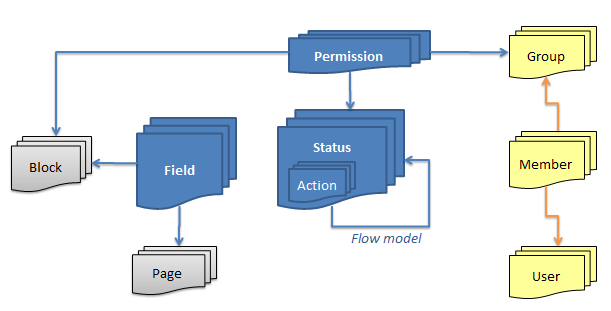
Tempus Serva uses a classic permission structure with some minor extensions
**Users**
- User profiles can be bound to existing AD/LDAP repositories
- Special properties on users include
- Administrator: Allow access to backend
- Data handler: Bulk upload data
- User creator
**Membership** is the relation between a user and a group
- Previous membership are logged in the database for forensic purposes
**Groups** are list of users tied to certain permissions in solutions
[](https://docs.tsnocode.com/uploads/images/gallery/2025-08/dpw4oJBDwV3MJrB5-image.png)
## Subgroups
If the policy doAdvancedGroupSecurity is enabled subgroups is enabled. Eg. groups can be nested under each other.
### Assigned Groups
When using subgroups with Assigned groups, the parent group gains access equal to all the subgroups.
This can be used to create a super-user group that has all other groups as subgroups, thus allowing access to the entire system, without granting the super-user group direct access.
### Exclusive Groups
When using subgroups with Exclusive groups, the parent group gets access to all records tagget with the sub-groups.
This can be used to create sub-departments and having a supervisor with access across.