OLAP
OLAP example
We have a solution
- Change management [changemanagement]
The solution contains the following lookup fields
- Scope [TYPE]
- Type [TASKTYPE]
It also has some decimal values
- Estimate [ESTIMATE]
- Realized [REALIZED]
In our reporting we want to see distributions by
- A period hierarchy: Year / Quarter / Month
- Categories by Scope, Type and Status
Setting up the cube
A new OLAP cube is set up in: "Integration" > "OLAP cubes" > "Add"
Basic information
- Name display: sample1
- Cube header: Report sample1
Cube definition ("Cube Schema XML")
For further help to designing schemas please refer to the following ressources
<Cube name="sample1cube">
  <Table name="data_changemanagement"/>
  <Dimension name="Scope" foreignKey="TASKTYPE">
    <Hierarchy hasAll="true" primaryKey="LookupID">
    <Table name="formfieldlookup"/>
      <Level name="Type" column="Value" uniqueMembers="true"/>
    </Hierarchy>
  </Dimension>
  <Dimension name="Type" foreignKey="TYPE">
    <Hierarchy hasAll="true" primaryKey="LookupID">
    <Table name="formfieldlookup"/>
      <Level name="Type" column="Value" uniqueMembers="true"/>
    </Hierarchy>
  </Dimension>
  <Dimension name="Status" foreignKey="StatusID">
    <Hierarchy hasAll="true" primaryKey="StatusID">
    <Table name="formstatus"/>
      <Level name="Type" column="Status" uniqueMembers="true"/>
    </Hierarchy>
  </Dimension>
  <Dimension name="Period" type="TimeDimension">
    <Hierarchy name="Periode" hasAll="true" allMemberName="All period">
      <Table name="data_changemanagement"/>
      <Level name="Aar" levelType="TimeYears" uniqueMembers="true">
        <KeyExpression>
          <SQL dialect="mysql">Year(CreatedAt)</SQL>
          <SQL dialect="generic">YEAR</SQL>
        </KeyExpression>
      </Level>
      <Level name="Kvartal" uniqueMembers="false" levelType="TimeQuarters">
        <KeyExpression>
          <SQL dialect="mysql">Quarter(CreatedAt)</SQL>
          <SQL dialect="generic">Quarter</SQL>
        </KeyExpression>
      </Level>
      <Level name="Maaned" uniqueMembers="false" levelType="TimeMonths">
        <KeyExpression>
          <SQL dialect="mysql">Month(CreatedAt)</SQL>
          <SQL dialect="generic">Month</SQL>
        </KeyExpression>
      </Level>
    </Hierarchy>
  </Dimension>
  <Measure name="Revision" column="Revision" aggregator="sum" formatString="Standard"/>
  <Measure name="Estimate" column="ESTIMATTIMER" aggregator="sum" formatString="Standard"/>
  <Measure name="Realized" column="REALISERETTIMER" aggregator="sum" formatString="Standard"/>
</Cube>
MDX query ("Cube Query MDX")
For further help to designing queries please refer to the following ressources
SELECT
  NON EMPTY {([Measures].[Estimate],[Measures].[Realized])} ON COLUMNS,
  NON EMPTY {([Period],[Type],[Status])} ON ROWS
FROM [sample1cube]
Results
The cube is acccesed via this URL (or press "test" form the OLAP overview) http://YOUR_DOMAIN/TempusServa/olapview.jsp?query=sample1
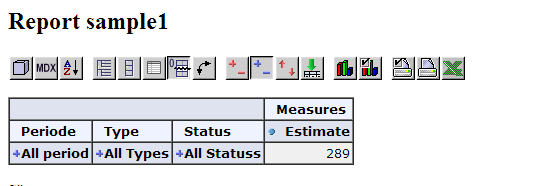
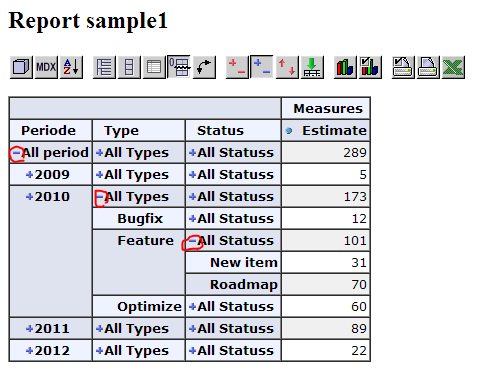
Schema cheatsheet
Introduction
The below paragraphs contains sample snippets for your OLAP schema.
Precise documentation on how to define a schema, can be found at: http://mondrian.pentaho.com/documentation/schema.php
Schema structure overview
- Table (one):
- Structure: The centre table containing the measures (FACT table)
- OLAP cube: Not displayed
- Dimensions (many)
- Structure: Related tables or groupable values (FACT table relations)
- OLAP cube: Columns/row "headers" in the cube
- Measures (many)
- Structure: Values found in the centre table (FACT table values)
- OLAP cube: Numbers to be displayed in the table cells
Defining dimensions for related values
Standard lookup value
The cube schema below only needs adjustment for the system name of the lookup field.
Structure
| Solution as displayed | "Sample solution" : "Category" = xxx |
| Solution system names | sample : CATEGORY = xxx |
| Database table names | data_sample : CATEGORY = xxx |
Data model
- data_sample
- CATEGORY: Field containing the lookup value
Cube schema
...
<Dimension name="Example" foreignKey="CATEGORY">
   <Hierarchy hasAll="true" primaryKey="LookupID">
      <Level name="Category" column="Value" uniqueMembers="true" />
   </Hierarchy>
</Dimension>
...
Simple choice value
The cube schema below only needs adjustment for the system name of the lookup field.
Structure
| Solution as displayed | "Sample solution" : "My choice" = xxx |
| Solution system names | sample : CHOICE = xxx |
| Database table names | data_sample : CHOICE = xxx |
Data model
- data_sample
- CHOICE: Field containing the lookup value
Cube schema
...
<Dimension name="Example" foreignKey="CHOICE">
   <Hierarchy hasAll="true" primaryKey="ChoiceID">
      <Level name="Answer" column="Value" uniqueMembers="true" />
   </Hierarchy>
</Dimension>
...
Standard record Status
The cube schema below can be copied directly without modification: The status properties and tablenames are allways the same.
Structure
| Solution as displayed | "Sample solution" : "Status" = xxx |
| Solution system names | sample : "StatusID" = xxx |
| Database table names | data_sample "StatusID" = xxx |
Data model
- data_sample
- StatusID: Field containing status reference (allways the same)
Cube schema
...
<Dimension name="Example" foreignKey="StatusID">
   <Hierarchy hasAll="true" primaryKey="StatusID">
      <Level name="Status" column="Status" uniqueMembers="true" />
   </Hierarchy>
</Dimension>
...
Defining dimensions for related records
Structure
| Solutions as displayed | "Some child" : "Parent" -> "Father or mother" |
| Solution system names | child : PARENT -> parent |
| Database table names | data_child : PARENT -> data_parent |
Data model
- data_child
- PARENT: Key to the "parent" solution
- data_parent
- GRANDPARENT: Key to the "grandparent" solution
- PARENTNAME: Descriptive field
Cube schema
...
<Dimension name="Example" foreignKey="PARENT">
   <Hierarchy hasAll="true" primaryKey="DataID" primaryKeyTable="data_parent">
      <Level name="Parent" column="PARENTNAME" uniqueMembers="true" />
   </Hierarchy>
</Dimension>
...Note that the schemas for multi join tables are written from "inside out", that might seem counterintuitive i relation to what you want to display in the cube later.
Structure
| Solutions as displayed | "Some child" : "Parent" -> "Father or mother" : "Grand parent" -> "Grandma and Grandpa's" |
| Solution system names | child : PARENT -> parent : GRANDPARENT -> grandparent |
| Database table names | data_child : PARENT -> data_parent : GRANDPARENT -> data_grandparent |
Data model
- data_child
- PARENT: Key field pointing to the "parent" solution
- data_parent
- GRANDPARENT: Key field pointing to the "grandparent" solution
- PARENTNAME: Descriptive field
- data_grandparent
- GRANDPARENTNAME: Descriptive field
Cube schema
...
<Dimension name="Example" foreignKey="PARENT">
   <Hierarchy hasAll="true" primaryKey="DataID" primaryKeyTable="data_parent">
      <Join leftKey="GRANDPARENT" rightKey="DataID" />
      <Level name="Grandparent" table="data_grandparent" column="GRANDPARENTNAME" uniqueMembers="true" />
      <Level name="Parent" table="data_parent" column="PARENTNAME" uniqueMembers="true" />
   </Hierarchy>
</Dimension>
...
Defining dimensions for inline values
Text values
Cube schema
 ...
 <Dimension name="Category">
     <Hierarchy hasAll="true">
         <Level name="Name" column="NAME" uniqueMembers="true"/>
     </Hierarchy>
 </Dimension>
 ...
Year/integer values
Cube schema
 ...
 <Dimension name="Period" type="TimeDimension">
     <Hierarchy hasAll="true">
         <Level name="Aar" column="YEAR" type="Numeric" uniqueMembers="false" levelType="TimeYears"/>
     </Hierarchy>
 </Dimension>
 ...
Date / datetime values
Cube schema
...
<Dimension name="Period" type="TimeDimension">
   <Hierarchy name="Periode" hasAll="true" allMemberName="All period">
      <Level name="Aar" levelType="TimeYears" uniqueMembers="true">
         <KeyExpression>
            <SQL dialect="mysql">Year(CreatedAt)</SQL>
            <SQL dialect="generic">YEAR</SQL>
         </KeyExpression>
      </Level>
      <Level name="Maaned" uniqueMembers="false" levelType="TimeMonths">
         <KeyExpression>
            <SQL dialect="mysql">Month(CreatedAt)</SQL>
            <SQL dialect="generic">Month</SQL>
         </KeyExpression>
      </Level>
   </Hierarchy>
</Dimension>
...
Enumeration values
Cube schema
 ...
 <Dimension name="Severity">
     <Hierarchy hasAll="true" primaryKey="SEVERITY">
         <InlineTable alias="enumeration">
         <ColumnDefs>
             <ColumnDef name="id" type="Numeric"/>
             <ColumnDef name="desc" type="String"/>
         </ColumnDefs>
         <Rows>
             <Row>
                 <Value column="id">1</Value>
                 <Value column="desc">High</Value>
             </Row>
             <Row>
                 <Value column="id">2</Value>
                 <Value column="desc">Medium</Value>
             </Row>
             ... more values ...
        </Rows>
     </InlineTable>
     <Level name="Severity" column="id" nameColumn="desc" uniqueMembers="true"/>
 </Hierarchy>
 </Dimension>
 ...
Defining measures
Normal values
Measures are allways numeric values, that can be agggated to higher levels (the levels in the dimensions)
| Type | Aggregator | Examples |
|---|---|---|
| Sums | SUM | Time spent, costs |
| Average | AVG | Process time |
Cube schema
Calculated values
Analyse Activity
User activity will display an OLAP cube for changes and updates to certain solutions.
Changes are defined by updates to the underlying record.
How to activate this feature
- User must have the Business analyst property set
- The solution must have Activity monitoring property set
- The service OLAP Activity must be active
Analyse Flowsteps
User activity will display an OLAP cube for flow in each process step for certain solutions.
The total flow time is defined as the time span between entry and exit point in time for each flow step (status).
Furthermore each status can have targets for good performance defined:
- Goal: Expected process time in this step
- Tolerance: Acceptable process time in this step
How to activate this feature
- User must have the Business analyst property set
- The solution must have Activity monitoring property set
- The service OLAP Flowsteps must be active
Analyse Flowtotal
User activity will display an OLAP cube for total flow time to certain solutions.
The total flow time is defined as the time span between creation and point in time where a final status i reached.
Furthermore each solution can have targets for good performance defined:
- Goal: Expected total process time
- Tolerance: Acceptable total process time
How to activate this feature
- User must have the Business analyst property set
- The solution must have Activity monitoring property set
- The service OLAP Flow total must be active