# Word documents from templates
## Basic template
### Checklist
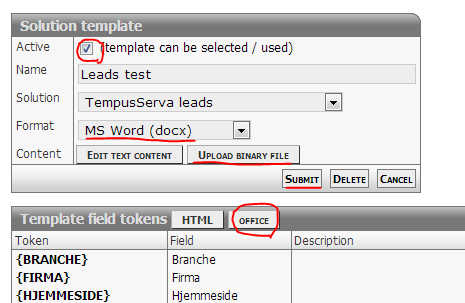
1. \[Solution\] > "Advanced" > Template: "Add"
- Copy template tags from popup: "Template field tokens" > "Office"
2. Prepare file on local PC
- Copy placeholder tags from backend
- Save in safe location so you dont need to download when updating later
3. \[Solution\] > "Advanced" > Template: "Add"
- Set content type to "MS Word" or "PDF"
- Upload file
4. If solution has more than 1 export template
- Check that solution has \[Solution\] > "Advanced" >"Template selector" enabled
[](https://wiki.tsnocode.com/index.php?title=File:Tutorial_wordtemplate.PNG)
### Trouble shooting
Content from TempusServa is not displayed inside tags
- Disable spelling/grammar
- Take care not to edit the text inside tags
- Select the whole tag before applying styling
- Paste tags from notepad or other program without text styling
- Try the "Fix word tags"-codeunit (insert link)
## Subtemplates
Subtemplates can be used for special fields that support the notion.
- Complex question
The whole sub template is injected into the tag, as if it had been normal data.
### Complex questions
Supported tag names
```
${FIELDLABEL}
${FIELDHELP}
${CHOICEIMAGE}
${CHOICELABEL}
${CHOICETEXT}
${ANSWERLABEL}
${ANSWERTEXT}
${PICTURE}
${COMMENT}
```
### Complex questions
Supported tag names in first template
```
${FIELDLABEL}
${FIELDHELP}
```
Supported tag names in second template
```
${LOCATION}
${CHOICEIMAGE}
${CHOICELABEL}
${CHOICETEXT}
${ANSWERLABEL}
${ANSWERTEXT}
```
### Special considerations
Named styling is not supported, but can work with a workaround.
1. Copy styled content from subtemplate
2. Paste into main template and save file
3. Remove content and save again
### Sections
Sections that are shown based on boolean test
```
```
## Trouble shooting
### Table page flow
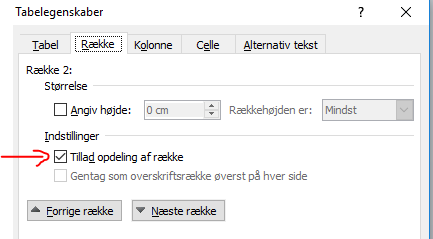
Word does not respect table setting for page flow, so table rows break in undesired ways
1. Create a new empty table with one cell (without borders)
2. Right-click cell and disable "Allow row to break across pages" / "Tillad opdeling af række"
3. Paste the old table into the new table
[](https://wiki.tsnocode.com/index.php?title=File:RowControl.PNG)