# Proxies and policies

This page tries to show how to configure a couple of central policies, based on how TS is hosted.

## Tomcat on port 80/443

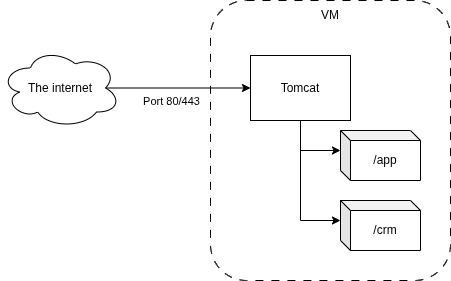
When running tomcat directly on port 80/443, the following policies should be set.

<table border="1" id="bkmrk-policy-value-applica" style="border-collapse: collapse; width: 100%;"><colgroup><col style="width: 50%;"></col><col style="width: 50%;"></col></colgroup><tbody><tr><td>**Policy**</td><td>**Value**</td></tr><tr><td>applicationIsBehindAReverseProxy</td><td>false</td></tr><tr><td>applicationIsHiddenBehindAReverseProxy</td><td>false</td></tr><tr><td>applicationlPort</td><td>80</td></tr><tr><td>applicationlPortSSL</td><td>443</td></tr><tr><td>securitySslPages</td><td>Depends on if SSL is enabled (recommended)</td></tr><tr><td>applicationServer</td><td>A domain pointing at the server</td></tr></tbody></table>

This was the default setup up untill 2025-Q2.  
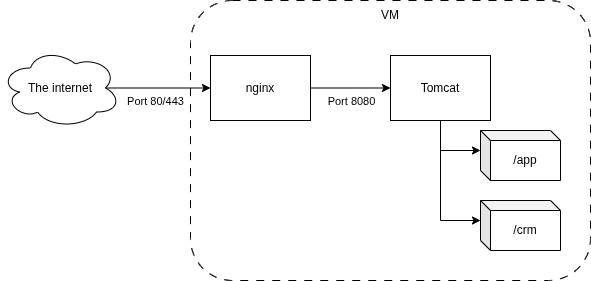
This illustration shows how the traffic is routed.

\[DIAGRAM\]

## Behind a proxy (nginx)

When running tomcat behind a reverse proxy (eg. nginx), the following policies should be set.

<table border="1" id="bkmrk-policy-value-applica-1" style="border-collapse: collapse; width: 100%;"><colgroup><col style="width: 50.0596%;"></col><col style="width: 50.0596%;"></col></colgroup><tbody><tr><td>**Policy**</td><td>**Value**</td></tr><tr><td>applicationIsBehindAReverseProxy</td><td>true</td></tr><tr><td>applicationIsHiddenBehindAReverseProxy</td><td>false</td></tr><tr><td>applicationlPort</td><td>80</td></tr><tr><td>applicationlPortSSL</td><td>443</td></tr><tr><td>securitySslPages</td><td>Depends on if SSL is enabled (recommended)</td></tr><tr><td>applicationServer</td><td>A domain pointing at the server</td></tr></tbody></table>

This is the default setup as of 2025-Q2.  
It helps when running SSL/TLS and multiple/changing domains.  
This illustration shows how the traffic is routed.

\[DIAGRAM\]

## Hidden behind a proxy

When hiding the webapps hosted by tomcat behind a reverse proxy (eg. nginx), the following policies should be set.

<table border="1" id="bkmrk-policy-value-applica-2" style="border-collapse: collapse; width: 100%;"><colgroup><col style="width: 50.0596%;"></col><col style="width: 50.0596%;"></col></colgroup><tbody><tr><td>**Policy**</td><td>**Value**</td></tr><tr><td>applicationIsBehindAReverseProxy</td><td>true</td></tr><tr><td>applicationIsHiddenBehindAReverseProxy</td><td>true</td></tr><tr><td>applicationlPort</td><td>80</td></tr><tr><td>applicationlPortSSL</td><td>443</td></tr><tr><td>securitySslPages</td><td>Depends on if SSL is enabled (recommended)</td></tr><tr><td>applicationServer</td><td>The domain pointing at the instance</td></tr></tbody></table>

This setup also requires that the context file for the given webapp is modified.  
The following attributes have to be added to the `Context` opening tag.

```
 useRelativeRedirects="false" sessionCookiePath="/"
```

All of this is handled by the `ts` script.

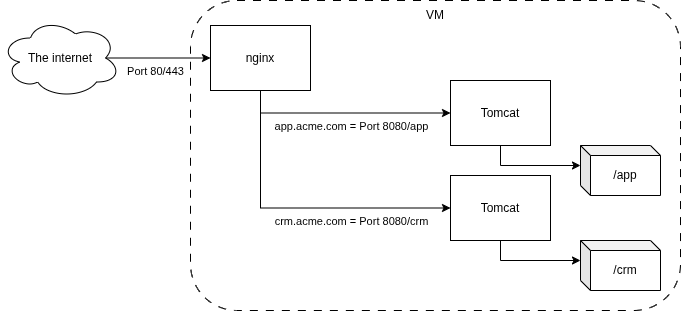
This is used for shared hosting, where multiple domains are pointing to the same server, as to not expose other installations/customers.  
This illustration shows how the traffic is routed.

\[DIAGRAM\]