
Calc: Formula
Formula based on other fields
Properties
- Type: Complex
- Groupable: No
- Show in lists: Yes
- Searchable: Yes
- Requires configuration: Yes
User interface
Field in show mode

Due to its nature this field has no special editing mode.
Configuration
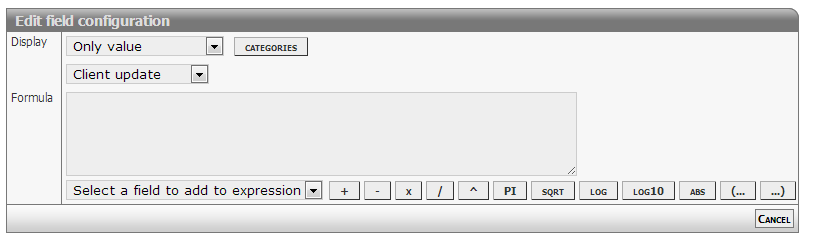
[Description of configs]
Complex formulas
Calculated formulas syntax follows is compliant with JavaScript syntax.
Common operators
- Add: +
- Subtract: -
- Division: /
- Multiply: *
- Modulus: %
- Precedence: ( ... )
Mathematical functions
- Absolute: abs
- Minimum: max
- Maximum: min
- Power: pow
- Square root: sqrt
- Logarithms: log log10 exp
- Rounding: ceil floor round
Mathematical constants
- Pi: pi
- E: e
Support for statements
This feature is enabled starting from version 2366.
IF statement
Syntax used matches JavaScript inline IF statements.
To make the statement work make sure to add a space:space or linebreak before ), after (, before and after ? and :.
Linebreaks get replaced with a space, before evaluation.
( Value1 Operator Value2 ? ValueIfTrue : ValueIfFalse )- Test
- First value or expression
- Operator
- Equal: =
- Unequal: !=
- Greater: > (>=)
- Lesser: < (<=)
- Second value or expression
- Result
- TRUE value or expression
- FALSE value or expression
Logical AND and OR
This syntax is not implemented.
It will maybe evaluate, but then fail.
If you need to chain comparisons, you have to do it like this:
( 172 == 172 && 1 == 1 && 60910 == 60910 ? 0 : 1 )
// Equals
( 172 == 172 ? ( 1 == 1 ? ( 60910 == 60910 ? 0 : 1 ) : 1 ) : 1 )
// Equals
( 172 == 172
    ? ( 1 == 1
        ? ( 60910 == 60910
            ? 0
            : 1 )
        : 1 )
    : 1
)
Quirks
As it can be seen in the samples here, a lot of extra spaces are required.
The extra space after an opening parentheses, the one before a closing paretheses, the ones aroung a question mark or colon.
All of those are needed in the current implementation.
Examples
Script code / specification
 var result;
 if ( [NUMBER1] >  [NUMBER2] ) {
       result = [NUMBER1] * 11;
 } else {
       result = [NUMBER3];
 }
 return result;
Expression to use in formula
( [NUMBER1] > [NUMBER2] ? [NUMBER1] * 11 : [NUMBER3] )Developer info
- FeltTypeID: 81
- SQL datatype: DECIMAL(20,4)
- Class name: FieldCalcFormula