
Create new GMA course
How to create a GMA course.
This introduction is available as a video and as a written article.
[INSERT VIDEO]
When you as a clinician, want to create a new GMA course, click the "Create new GMA course" button in the top-right corner of you home-screen on the platform.
This will redirect you to the form where you can start the new Course.
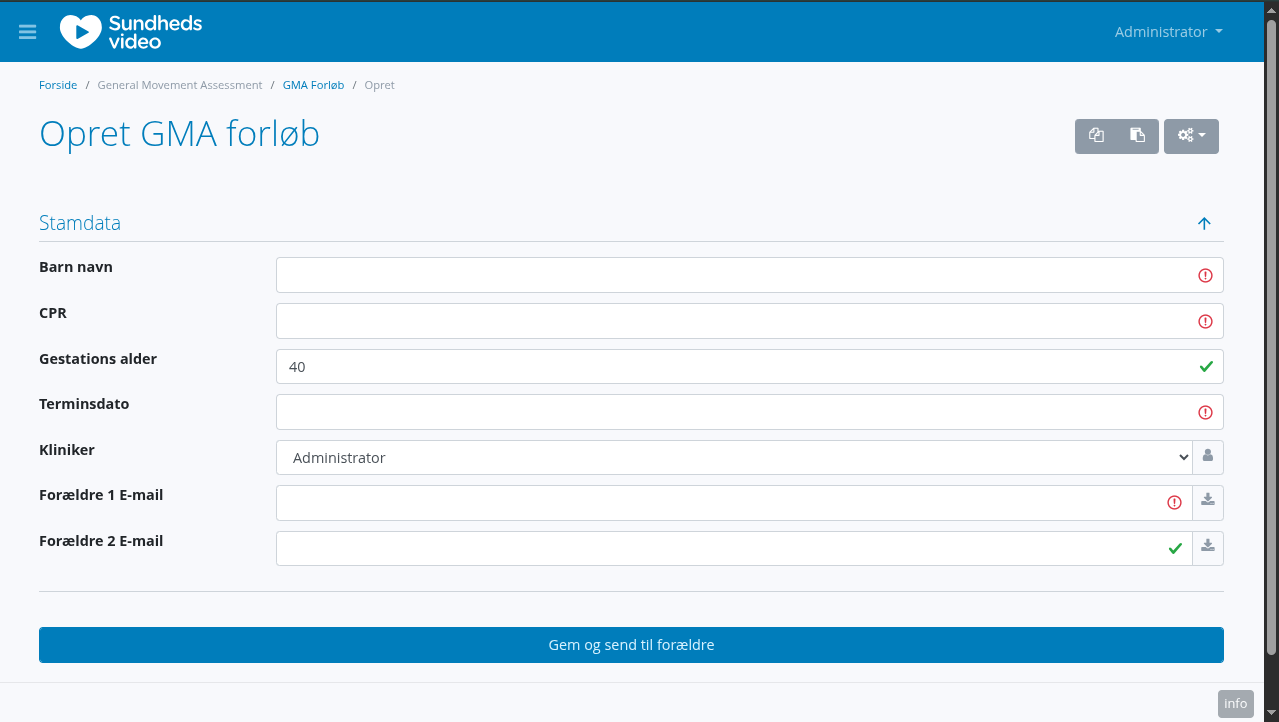
Here you see all the required information you have to fill in.
- Name of the child
- CPR of the child (danish SSN)
- Gestational age
- Due date (automatically calculated based on CPR and gestational age)
- The responseable clinician (prefilled with you)
- Email of the first parent
- Optionally, email of the second parent
Then, scroll down and press "Save and send to parents".
This sends an email to the parents, requesting their consent to use this system to process their childs data.
If your department is setup this special way, the parents will also be asked if they consent to the videos of their child being used for research and education.
The parent(s) will receive a link, where they can read and grant these consents.
Once one of the parents have given consent, the GMA course will change status to "Consent given" and you just have to wait for the system to do it's thing.
If the parents do not consent their data will automatically be deleted 19 weeks after the due date.
Once consent is given, the system will automatically notify the parents when it is time to submit a video.
This happens at week 12 and 14, and the parents have 3 weeks to submit each video.